// GitPulseMLC v1.3.0
Which of Your Repos Still Has Unpushed Work?
// Gallery
// Features
Why choose GitPulseMLC.
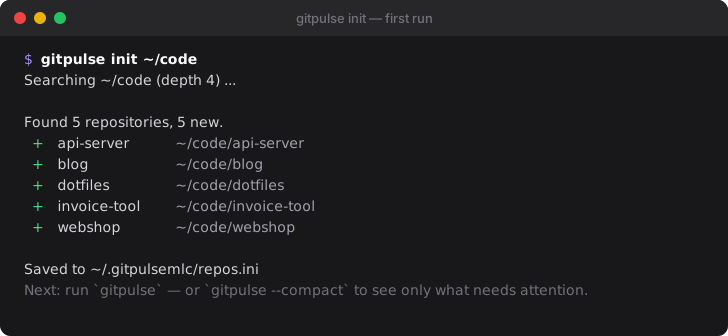
gitpulse init ~/code finds your repositories and writes the config for you.
Only reads: never commits, pulls, pushes or contacts a remote.
Scans repositories in parallel — 73 repositories in about 4 seconds instead of 33.
Modern, color-coded terminal output with dynamic alignment and styling.
Export results as high-contrast HTML reports or structured JSON data.
Hide clean repositories and focus only on those requiring immediate action.
Automatically flags local branches that haven't been touched in over 30 days.
Tidy up your dashboard with configurable path replacement for deep structures.
Tracks dirty worktrees, file-type summaries, and ahead/behind commit counts.
One command tells you. GitPulse checks all your local Git repositories at once — dozens in a few seconds — and lists the ones that need attention: uncommitted changes, commits that never got pushed, forgotten stashes and branches nobody has touched for weeks. It only reads — it never commits, pulls or pushes.
The problem
You work on twenty projects. On Friday you fixed something in the invoice tool, committed it — and forgot to push. On Monday you are on a different laptop, and the fix is not there. Or a server you maintain has local edits in a config repository that nobody committed.
git status answers this for one repository. GitPulse answers it for all of them, in one screen.
What you see
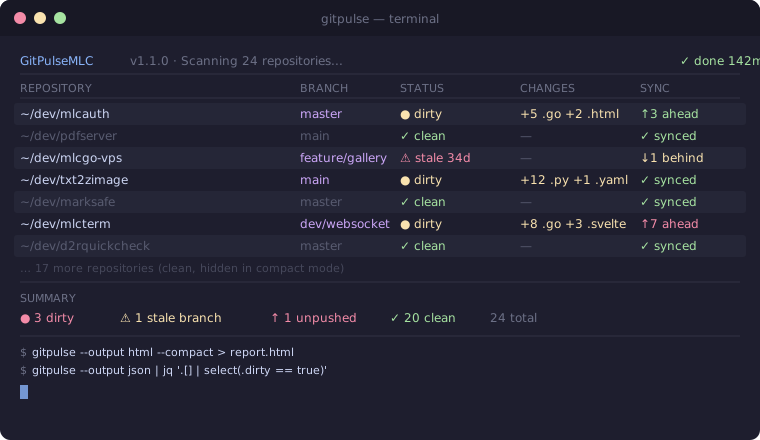
Every repository gets one line. The status column says what is open:
| Status | Meaning | What to do |
|---|---|---|
DIRTY (2.go, 1.css) |
uncommitted changes, grouped by file type | commit or discard |
↑2 |
2 local commits not pushed yet | git push |
↓3 |
3 commits on the remote you don't have | git pull |
1 stash |
work parked with git stash |
apply or drop it |
1 stale |
a branch untouched for 30+ days | delete or finish it |
CLEAN |
nothing to do | — |
gitpulse --compact hides the clean ones, so the list is exactly your to-do list.
Quickstart — two minutes
1. Install. Download the binary for your system below, or on Linux and macOS:
curl -fsSL https://raw.githubusercontent.com/hmsoft0815/GitPulseMLC/main/install.sh | sh
Debian/Ubuntu, Fedora and Alpine packages are on the GitHub releases page. With Go installed: go install github.com/hmsoft0815/GitPulseMLC/cmd/gitpulse@latest.
2. Point it at your code. GitPulse finds the repositories itself:
gitpulse init ~/code
Run it again for every other folder (gitpulse init ~/work). Repositories already known are never added twice.
3. Look.
gitpulse            # everything
gitpulse --compact  # only what needs attention
More than a terminal check
- Daily status mail:
gitpulse --htmlwrites a self-contained, high-contrast report for e-mail — put it in a cron job. - Scripts and monitoring:
gitpulse --jsongives the full state of every repository and branch as structured data. - Servers:
remote_gitpulseruns the same check on a Linux or macOS machine over SSH, without installing anything there.
See use cases for ready-to-copy examples and the documentation for every option.
Safe by design
GitPulse never writes to a repository and never contacts a remote. It reads what Git already knows locally — the last fetch included — so it is safe to run on production servers and in CI.