Bild als Puzzle — Schnitte entlang Bezier-Kurven
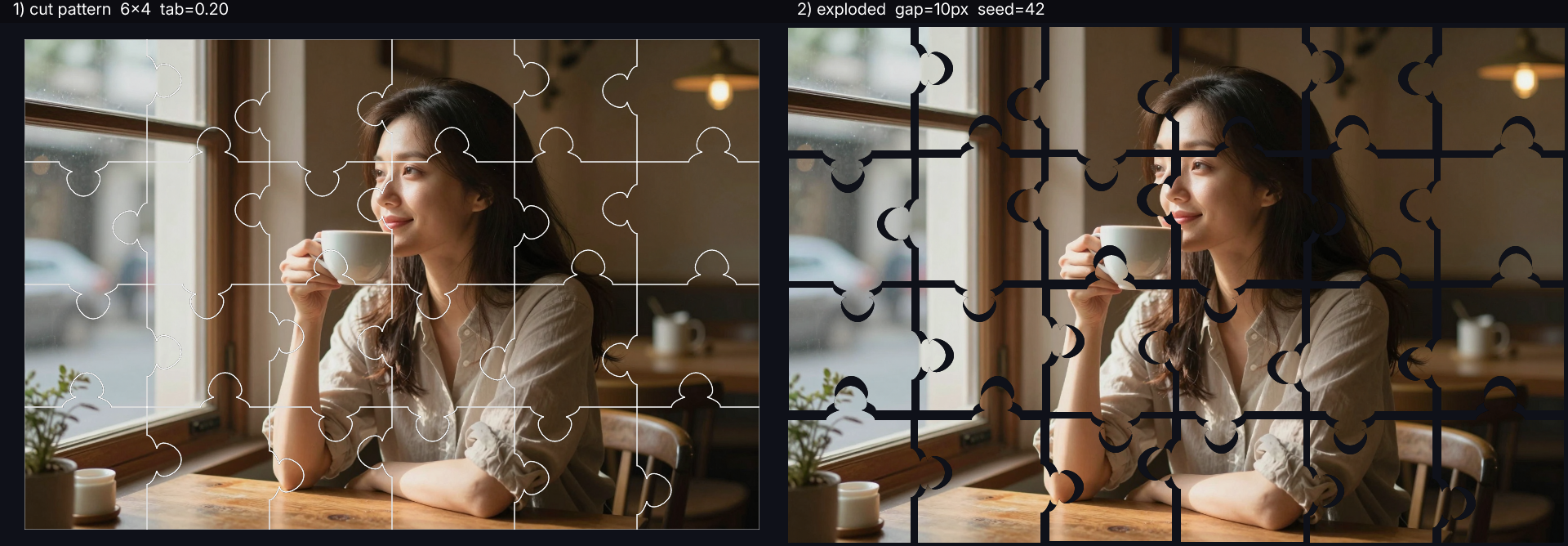
Macht aus jedem Foto ein klassisches Puzzle-Layout. Das Ergebnis sind zwei Panels nebeneinander: das Quellbild mit allen Schnittlinien weiß eingezeichnet plus eine „explodierte" Ansicht, in der jedes Teil leicht herausgezogen ist und die ineinandergreifenden Nasen sichtbar werden. Über Regler steuern Sie, aus wie vielen Teilen das Puzzle besteht (`COLS` × `ROWS`), wie groß die Nasen sind, wie deutlich die Hälse gepinscht sind und wie weit die Teile auseinanderdriften (`SHIFT`). `SEED` erzeugt ein anderes Zufallslayout. Ideal für Puzzle-Produkt-Mockups, Kinder-Material, Escape-Room-Grafik oder schlicht eine auffällige Präsentation eines Hero-Bildes.
INPUT

Cut pattern + exploded view
JavaScript
// Image-as-jigsaw — slice the input along bezier puzzle cuts.
// demo_puzzle.js
//!INPUT: INPUT
//!OUTPUT: OUTPUT
//!PARAM: COLS:number=6,min=2,max=12
//!PARAM: ROWS:number=4,min=2,max=10
//!PARAM: SHIFT:number=10,min=0,max=64
//!PARAM: SEED:number=42,min=0,max=10000
//!PARAM: MAX_W:number=900,min=400,max=2000
//!PARAM: TAB:number=0.20,min=0.05,max=0.35
//!PARAM: NECK:number=0.09,min=0.04,max=0.18
//!PARAM: BASE:number=0.20,min=0.10,max=0.30
//!PARAM: STEM:number=0.08,min=0.0,max=0.18
//!PARAM: CENTER_JITTER:number=0.18,min=0.0,max=0.30
//!PARAM: CUT_STROKE:number=1.5,min=0.5,max=4.0
//!PARAM: LABEL_SIZE:number=20,min=10,max=64

// Slices the input image into COLS × ROWS jigsaw pieces with
// classic bezier-curve tabs (positive / negative noses), then
// shows two panels side by side:
//
//   ┌────────────────────────┬────────────────────────┐
//   │  cut pattern overlay   │   exploded view        │
//   │  (white lines on src)  │  (each piece nudged    │
//   │                        │   away from grid centre)│
//   └────────────────────────┴────────────────────────┘
//
// Implementation: build SVG paths from the puzzle edge matrices,
// rasterise each piece's path as a white-filled mask via
// Engine.loadSVG(), apply that mask to a clone of the source
// (luminance-based clip), then blendAt the piece onto a dark
// canvas at a small offset. No new engine API needed — the
// existing SVG renderer + applyMask covers "cut path from image".

const SRC0 = Engine.loadImage(INPUT);
{
  const long = Math.max(SRC0.width, SRC0.height);
  if (long > MAX_W) {
    const s = MAX_W / long;
    SRC0.resize(Math.round(SRC0.width * s), Math.round(SRC0.height * s),
                Interp.Bilinear);
  }
}
const W = SRC0.width;
const H = SRC0.height;
const tileW = W / COLS;
const tileH = H / ROWS;

// Mulberry32 — deterministic PRNG seeded by SEED.
let _s = (SEED >>> 0) || 1;
function rnd() {
  _s = (_s + 0x6D2B79F5) >>> 0;
  let t = _s;
  t = Math.imul(t ^ (t >>> 15), 1 | t);
  t = (t + Math.imul(t ^ (t >>> 7), 61 | t)) ^ t;
  return ((t ^ (t >>> 14)) >>> 0) / 4294967296;
}

// Edge type matrices.
//   hEdges[c][r] for r=0..ROWS — horizontal interior between row r-1 and row r.
//   vEdges[c][r] for c=0..COLS — vertical interior between col c-1 and col c.
//   Boundary edges (r∈{0,ROWS}, c∈{0,COLS}) stay flat (type 0).
//   Interior types are randomly +1 or −1 (tab vs. dent).
//
// Parallel center matrices store the tab's position along the edge as a
// fraction in [0..1], measured in the "canonical" walking direction
// (L→R for horizontal, T→B for vertical). When a neighbour walks the
// same edge in reverse, it uses (1 - center) to keep the tab in the
// same physical place — that's what makes the pieces interlock.
function jitterCenter() {
  return 0.5 + (rnd() - 0.5) * 2 * CENTER_JITTER;
}

const hEdges = [], hCenter = [];
for (let c = 0; c < COLS; c++) {
  hEdges[c] = []; hCenter[c] = [];
  for (let r = 0; r <= ROWS; r++) {
    hEdges[c][r]  = (r === 0 || r === ROWS) ? 0 : (rnd() > 0.5 ? 1 : -1);
    hCenter[c][r] = (r === 0 || r === ROWS) ? 0.5 : jitterCenter();
  }
}
const vEdges = [], vCenter = [];
for (let c = 0; c <= COLS; c++) {
  vEdges[c] = []; vCenter[c] = [];
  for (let r = 0; r < ROWS; r++) {
    vEdges[c][r]  = (c === 0 || c === COLS) ? 0 : (rnd() > 0.5 ? 1 : -1);
    vCenter[c][r] = (c === 0 || c === COLS) ? 0.5 : jitterCenter();
  }
}

// One puzzle edge as an SVG path fragment with a classic neck-bulb tab:
//
//   ··················              ··················
//                  ___                              ___
//                 /   \   ←  bulb (round head)     /   \
//                |     |                          |     |
//                 \   /   ←  neck (pinch)          \   /
//        ________/   \________            ________/   \________
//        baseline (edge)                     ...with `cen` shift
//
// `type` is +1 (tab detours left of motion) or −1 (right). 0 = straight.
// `cen`  is the tab's centre as a fraction along the edge, in [0..1].
//        cen=0.5 → centred. The neighbour walking this edge in reverse
//        uses (1-cen) — that keeps the physical bulb in one place.
function edgeD(p1x, p1y, p2x, p2y, type, cen) {
  if (type === 0) { return `L ${p2x},${p2y}`; }
  const dx = p2x - p1x, dy = p2y - p1y;
  // (along, normal) → world coords. `along` is fraction in [0..1] along
  // p1→p2; `normal` is fraction in same units, in the tab direction.
  const ux = -dy * type, uy = dx * type;
  const pt = (a, n) => [p1x + dx*a + ux*n, p1y + dy*a + uy*n];

  // Geometry — fractions of edge length.
  const halfBulb = TAB;          // bulb radius (and apex height above neck)
  const stem     = STEM;         // neck height above baseline
  const baseHalf = BASE;         // half-width of tab base
  const neckHalf = NECK;         // half-width at neck (pinch)
  const KAPPA    = 0.5523;       // bezier circle approximation factor

  // 5 anchor points along the silhouette: baseL → neckL → apex → neckR → baseR.
  const baseL = pt(cen - baseHalf, 0);
  const neckL = pt(cen - neckHalf, stem);
  const apex  = pt(cen,            stem + halfBulb);
  const neckR = pt(cen + neckHalf, stem);
  const baseR = pt(cen + baseHalf, 0);

  // Stem-out (baseL → neckL): flare upward, then narrow into the neck.
  const cp1A = pt(cen - baseHalf,                    stem * 0.55);
  const cp2A = pt(cen - neckHalf - baseHalf*0.10,    stem * 0.95);
  // Bulb left half (neckL → apex): quarter-circle on the left side.
  const cp1B = pt(cen - neckHalf - halfBulb*KAPPA*0.9, stem + halfBulb*0.10);
  const cp2B = pt(cen - halfBulb*KAPPA,                stem + halfBulb);
  // Bulb right half (apex → neckR): mirror.
  const cp1C = pt(cen + halfBulb*KAPPA,                stem + halfBulb);
  const cp2C = pt(cen + neckHalf + halfBulb*KAPPA*0.9, stem + halfBulb*0.10);
  // Stem-in (neckR → baseR): mirror of stem-out.
  const cp1D = pt(cen + neckHalf + baseHalf*0.10,    stem * 0.95);
  const cp2D = pt(cen + baseHalf,                    stem * 0.55);

  return `L ${baseL[0]},${baseL[1]} `
       + `C ${cp1A[0]},${cp1A[1]} ${cp2A[0]},${cp2A[1]} ${neckL[0]},${neckL[1]} `
       + `C ${cp1B[0]},${cp1B[1]} ${cp2B[0]},${cp2B[1]} ${apex[0]},${apex[1]} `
       + `C ${cp1C[0]},${cp1C[1]} ${cp2C[0]},${cp2C[1]} ${neckR[0]},${neckR[1]} `
       + `C ${cp1D[0]},${cp1D[1]} ${cp2D[0]},${cp2D[1]} ${baseR[0]},${baseR[1]} `
       + `L ${p2x},${p2y}`;
}

// Closed path string for one piece (clockwise: top → right → bottom → left).
// When walking an edge in reverse, both the type sign AND the centre
// fraction need to flip (1 - cen) so the physical tab stays in place.
function piecePath(c, r) {
  const x0 = c * tileW,     y0 = r * tileH;
  const x1 = x0 + tileW,    y1 = y0 + tileH;
  let d = `M ${x0},${y0} `;
  d += edgeD(x0, y0, x1, y0,  hEdges[c][r],       hCenter[c][r])       + ' '; // top L→R
  d += edgeD(x1, y0, x1, y1,  vEdges[c+1][r],     vCenter[c+1][r])     + ' '; // right T→B
  d += edgeD(x1, y1, x0, y1, -hEdges[c][r+1], 1 - hCenter[c][r+1])     + ' '; // bottom R→L
  d += edgeD(x0, y1, x0, y0, -vEdges[c][r],   1 - vCenter[c][r])       + ' '; // left B→T
  return d + 'Z';
}

// ── Panel A: cut-pattern overlay ─────────────────────────────────────
let allPaths = '';
for (let r = 0; r < ROWS; r++) {
  for (let c = 0; c < COLS; c++) {
    allPaths += `<path d="${piecePath(c, r)}" fill="none" `
             +  `stroke="white" stroke-width="${CUT_STROKE}" `
             +  `stroke-opacity="0.85"/>`;
  }
}
const overlaySVG =
  `<svg xmlns="http://www.w3.org/2000/svg" `
  + `width="${W}" height="${H}" viewBox="0 0 ${W} ${H}">`
  + allPaths + `</svg>`;

// Pad so the outermost pieces in panel B don't get clipped by their offsets.
// With grid-spread, max |ox| = (COLS-1)/2 * SHIFT + jitter; same for oy.
// Panel A uses the same canvas size for clean side-by-side composition.
const BG = new Pixel(0.06, 0.07, 0.10, 1.0);
const PAD_X = Math.ceil(SHIFT * ((COLS - 1) / 2 + 0.5));
const PAD_Y = Math.ceil(SHIFT * ((ROWS - 1) / 2 + 0.5));
const cellW = W + 2 * PAD_X;
const cellH = H + 2 * PAD_Y;

const panelA = Engine.createImage(1, 1);
panelA.setPixel(px(0, 0), BG);
panelA.resize(cellW, cellH);
panelA.blendAt(SRC0, px(PAD_X, PAD_Y), 1.0, BlendMode.Over);
{
  const lines = Engine.loadSVG(overlaySVG);
  panelA.blendAt(lines, px(PAD_X, PAD_Y), 1.0, BlendMode.Over);
  lines.free();
}

// ── Panel B: exploded view — uniform grid spread + small jitter ──────
// Adjacent pieces are SHIFT pixels apart (grid expansion), with small
// random nudge per piece. Result: every neighbour-pair has a visible gap.
const panelB = Engine.createImage(1, 1);
panelB.setPixel(px(0, 0), BG);
panelB.resize(cellW, cellH);

for (let r = 0; r < ROWS; r++) {
  for (let c = 0; c < COLS; c++) {
    const d = piecePath(c, r);
    const svg = `<svg xmlns="http://www.w3.org/2000/svg" `
              + `width="${W}" height="${H}" viewBox="0 0 ${W} ${H}">`
              + `<path d="${d}" fill="white"/></svg>`;
    const mask = Engine.loadSVG(svg);
    const piece = SRC0.clone();
    piece.applyMask(mask);
    mask.free();

    const sx = c - (COLS - 1) / 2;
    const sy = r - (ROWS - 1) / 2;
    const ox = Math.round(sx * SHIFT + (rnd() - 0.5) * SHIFT * 0.3);
    const oy = Math.round(sy * SHIFT + (rnd() - 0.5) * SHIFT * 0.3);
    panelB.blendAt(piece, px(PAD_X + ox, PAD_Y + oy), 1.0, BlendMode.Over);
    piece.free();
  }
}

SRC0.free();

// ── Compose the two panels side-by-side, with a label band on top. ──
const bandH = LABEL_SIZE + 8;
const out = Engine.createImage(1, 1);
out.setPixel(px(0, 0), new Pixel(0.05, 0.05, 0.07, 1.0));
out.resize(cellW * 2, cellH + bandH);

out.drawText(`1) cut pattern  ${COLS}×${ROWS}  tab=${TAB.toFixed(2)}`,
             16, LABEL_SIZE - 2,
             { size: LABEL_SIZE, color: NamedColor.white });
out.drawText(`2) exploded  gap=${SHIFT}px  seed=${SEED}`,
             cellW + 16, LABEL_SIZE - 2,
             { size: LABEL_SIZE, color: NamedColor.white });

out.blendAt(panelA, px(0,     bandH), 1.0, BlendMode.Over);
out.blendAt(panelB, px(cellW, bandH), 1.0, BlendMode.Over);

panelA.free();
panelB.free();
out.save(OUTPUT);
out.free();

// © 2026 Michael Lechner · mlc OpticScript · https://mlcgo.eu · Elastic License 2.0