// MCP-Tester v1.9.0
MCP-Tester
// Gallery
// Features
Why choose MCP-Tester.
Connect to any stdio, Streamable HTTP or SSE server with a single command. No config file needed for a quick check.
Checks protocol version, tool definitions, icons, cache hints and best practices — a score with concrete findings, usable as a CI gate and as a README badge.
Readable .mcp scripts with variables and assertions for tools, tasks, elicitation, notifications, skills and apps — exit code and JSON for CI.
Regularly updated to the latest MCP specification; flags outdated features early. What is checked as of which date is documented.
See what a third-party server hands to the model: skills, UIs with their external domains and permissions, sign-in flows.
docs writes a server's tools, parameters, annotations, prompts, resources and instructions as Markdown — to read, to hand to an LLM, or to keep in sync with --check.
Test protected servers: OAuth 2.1 with PKCE, client credentials, enterprise login via ID-JAG, bearer tokens. auth-check shows the offered flows.
http-check probes a Streamable HTTP endpoint: required headers, error codes, Origin validation, no sessions.
The official extensions: run and cancel long-running calls as tasks, verify published skills, check interactive UIs.
mcp-test-server demonstrates the protocol incl. OAuth; pkg/mcptasks and pkg/mcpskills add tasks and skills to go-sdk servers.
Manage multiple servers in mcp-tester.yml — switch between local build, staging and production with a single flag.
MCP-Tester is a command-line tool for everyone who builds or uses MCP servers. It connects to any MCP server – local or remote – and checks it the way a client sees it: against the current specification 2026-07-28.
No GUI, no browser plugin. A single binary that speaks the MCP protocol.
Why MCP-Tester?
New hosts, harnesses and models appear almost daily, and the MCP specification keeps evolving. A server that does not follow it closely then "suddenly" stops working well: calls fail with stricter clients, error messages do not help the model, or it burns tokens on retries.
- Write tests instead of clicking. Unit tests check handlers, not the protocol contract.
.mcptest scripts check the server as a black box over the real transport – as a gate in CI and Taskfiles. - Know early what the next spec requires. MCP-Tester is regularly updated to the latest specification and also flags outdated features such as old protocol versions or removed methods. Testing early pays off most for new features like authorization – mistakes there can be dangerous and expensive.
- Check third-party servers before you enable them. Even for closed-source servers,
docs,inspect,skills --verify,apps,auth-checkandhttp-checkshow what a server can do, which instructions it hands to the model, which permissions and external domains its UIs ask for, how to sign in and how cleanly it is implemented – a basis for the decision before a "real" LLM uses it. - Finds bugs in SDKs, too. Because it checks from the outside against the specification, SDK bugs show up as well – while adapting to 2026-07-28, for example in the official Go SDK.
Installation
Download the binary (no runtime required): put the binary for your platform from the download section into your PATH.
Via Go:
go install github.com/hmsoft0815/mlc_mcptester/cmd/mcp-tester@latest
Via curl (Linux/macOS) – installs to ~/.local/bin, no sudo:
curl -sSL https://raw.githubusercontent.com/hmsoft0815/mlc_mcptester/main/scripts/install.sh | bash
For coding agents: mcp-tester agent-skill install teaches Claude Code, Gemini CLI, OpenCode and Codex to use the tester – which command is for what, how to write .mcp scripts, what counts in CI. The skill file goes into each harness's user directory and always matches the installed version.
Quick Start: test any MCP server in 60 seconds
# Add a server profile (here: the official MCP everything server via npx)
mcp-tester profile add my-server -c "npx -y @modelcontextprotocol/server-everything"

# Analyze the server: protocol, capabilities, quality score
mcp-tester inspect -p my-server

# List tools and call one
mcp-tester list -p my-server
mcp-tester call echo -p my-server --args '{"message": "hello"}'
-c starts a local stdio server, -u connects to a remote server over Streamable HTTP (or legacy SSE).
Server inspection
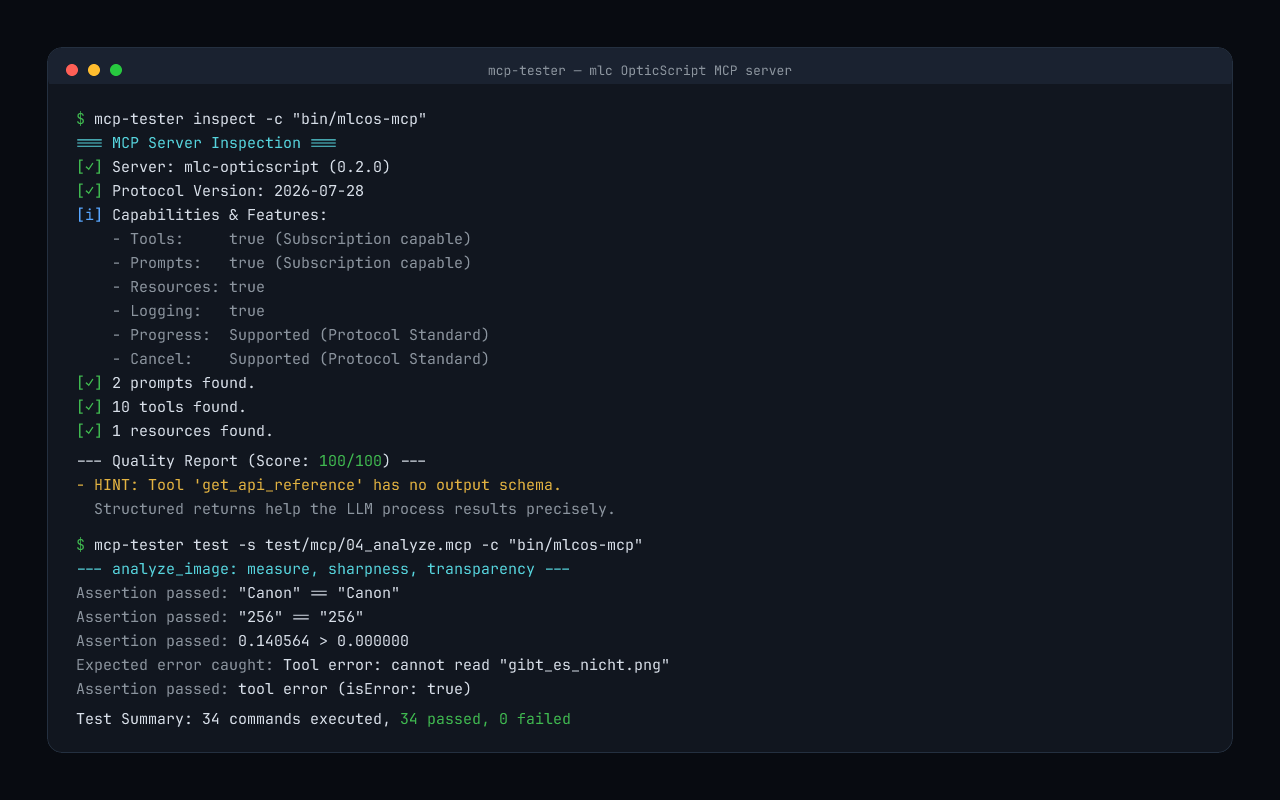
inspect checks the protocol version, tool definitions (names, schemas, titles, annotations, x-mcp-header), icons, cache hints, extensions and best practices, and returns a quality score with concrete findings. Protocol errors – such as a tools/list that fails although the capability is declared – end the run with exit 1.
mcp-tester inspect -p my-server
mcp-tester inspect -u https://my-server.example.com/mcp --min-score 90   # as a CI gate
mcp-tester inspect -p my-server --badge docs/mcpcheck.svg                  # status badge for your README
Does the score have to be 100? No. It is based on our own experience and does not automatically call for a change – but it is a useful assessment. Protocol errors and FAIL results, on the other hand, violate MUST rules of the specification.
Size up a third-party server in two minutes
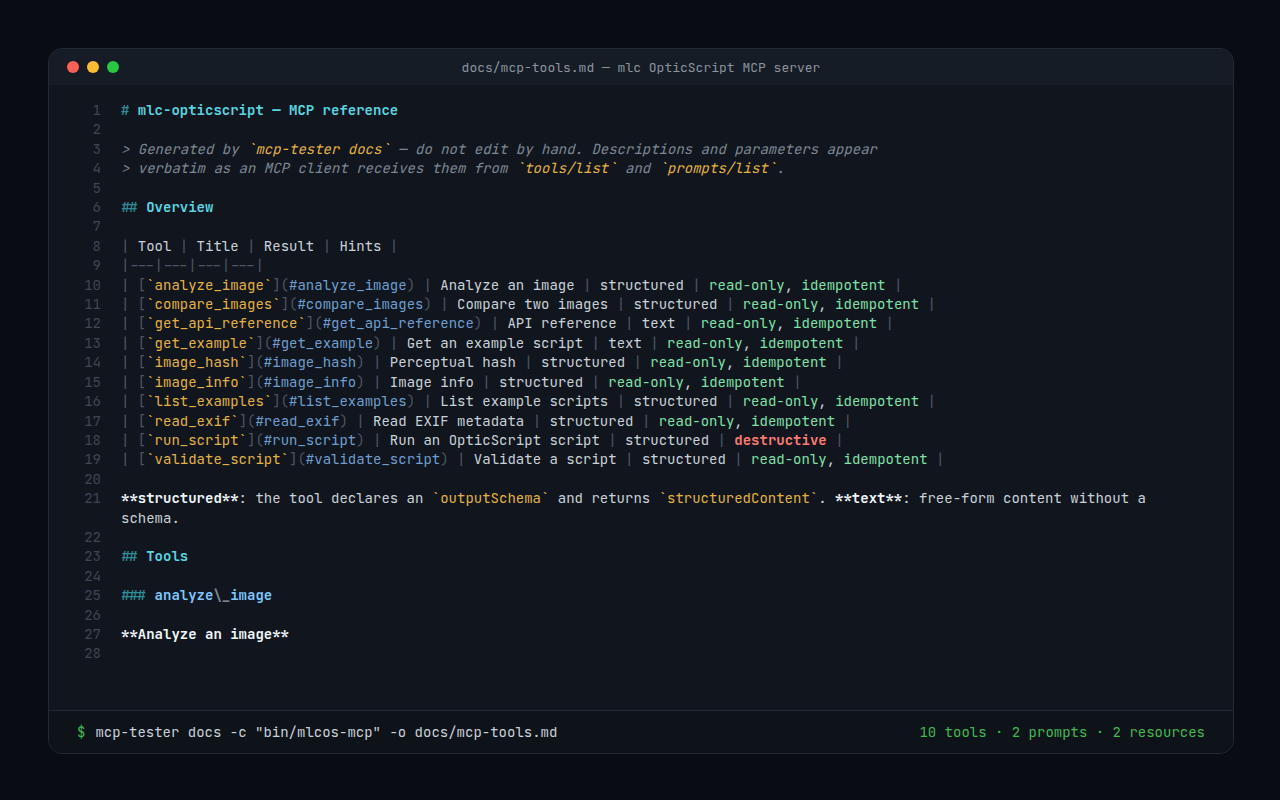
docs reads everything a server offers over the protocol and writes it as one Markdown file: tools with their parameters and result fields, annotations such as readOnlyHint and destructiveHint, prompts, resources and the instructions the server hands to the model. It works with any server, regardless of language and SDK, and without the source code.
mcp-tester docs -u https://third-party.example/mcp > server.md
mcp-tester inspect -u https://third-party.example/mcp
Read server.md at your own pace or hand it straight to an LLM: "What can this server do, which tools write or delete something, where are descriptions missing?" For your own servers the same file serves as a reference in the repository; docs --check fails in CI as soon as it no longer matches the server.
Automated test scripts
.mcp scripts with a simple, readable grammar – for regression tests and CI:
# Example: an image generator with the tool generate_image
call_tool generate_image prompt:"a red flower"
set_var size $.size
assert_equals $size "512x512"

expect_error call_tool generate_image prompt:""
assert_tool_error
mcp-tester test --script tests/scenario.mcp -p local
Scripts cover tools, tasks, completion, elicitation, sampling, roots, notifications, skills and MCP Apps. A failed command ends the run with exit 1; --format json returns a machine-readable summary. Every result is checked against the tool's outputSchema – as strictly as the official TypeScript SDK.
New in 1.9: a Markdown reference of a server
| Command / feature | What for |
|---|---|
docs -o docs/mcp-tools.md |
Writes tools, prompts, resources and instructions as Markdown: parameter tables in the server's order, result fields, annotations – read over the protocol, for any server whatever its language or SDK |
docs --check docs/mcp-tools.md |
CI gate: exit 1 as soon as the file no longer matches the server |
inspect |
Names parameters without a description – guesswork for the model |
New in 1.8: checking the Tasks extension
| Command / feature | What for |
|---|---|
tasks |
Checks a server against the Tasks extension: error codes without calling a tool; with --tool the whole life of a task (status transitions, input requests, cancellation, notifications/tasks) |
tasks --other-bearer |
A second identity must neither read, answer nor cancel someone else's task |
inspect |
Also checks the Tasks extension's error codes; MUST violations now always cost points, the readOnlyHint bonus only offsets quality deductions – some scores drop |
| Cross-check with TypeScript | The tester is also checked against a server on the TypeScript SDK v2 and against the official Tasks client |
New in 1.7: less noise about output schemas
| Command / feature | What for |
|---|---|
| Output schema hints | Tools without an output schema share one line instead of one each; --hints-per-tool lists them separately again |
inspect --text-only |
Tools that return plain text on purpose (Markdown, source code) need no output schema: no hint, no deduction, openly listed as INFO; also in a profile (text_only:) |
New in 1.6: status badge, agent skill, cache check
| Command / feature | What for |
|---|---|
inspect --badge, --badge-json |
README status badge: mcpcheck │ spec 2026-07-28 · 95/100 – red on protocol errors, as a self-contained SVG or a shields.io endpoint |
agent-skill install |
Skill file for Claude Code, Gemini CLI, OpenCode and Codex, in each harness's user directory |
install.sh |
Installs to ~/.local/bin, no sudo |
inspect --read-resources |
1.6.1: cache hints per spec – warns when per-user content is marked public under credentials, so shared caches may serve it to other users |
| INFO lines | 1.6.1: notes that do not affect the score, e.g. on ttlMs: 0 or on deprecated features (logging, sampling, roots) a server still uses |
New in 1.4 and 1.5: current with specification 2026-07-28
| Command / feature | What for |
|---|---|
http-check |
Check a Streamable HTTP endpoint against the transport rules: required headers, error codes, Origin, sessions |
--oauth, --bearer, -H |
Test protected servers – full OAuth 2.1 flow with PKCE, also without a browser for CI |
call --task, call_task |
Tasks extension: start, poll and cancel long-running calls, supply input |
skills --verify |
Skills extension: list published skills and check them against manifest, digests and frontmatter |
elicit_response, sample_response |
Multi round-trip: test servers that ask for input in scripts |
listen, wait_notification |
Notifications via subscriptions/listen |
complete |
Argument completion (completion/complete) |
auth-check |
1.5: shows how a server is protected and which OAuth flows it offers; checks the metadata |
--oauth-client-credentials, --oauth-enterprise |
1.5: auth extensions – machine-to-machine and enterprise login via ID-JAG |
apps, verify_apps |
1.5: MCP Apps – check interactive UIs, external domains and requested permissions before enabling |
What MCP-Tester checks as of which date is recorded in the spec coverage.
Protected servers
# How is the server protected, which sign-in flows does it offer?
mcp-tester auth-check -u https://example.com/mcp

# Token, OAuth in the browser, machine-to-machine, enterprise login
mcp-tester list -u https://example.com/mcp --bearer "$TOKEN"
mcp-tester inspect -u https://example.com/mcp --oauth
mcp-tester list -u https://example.com/mcp --oauth-client-credentials --oauth-client-id svc --oauth-client-secret "$SECRET"
mcp-tester list -u https://example.com/mcp --oauth-enterprise --idp-issuer https://idp.example \
  --idp-client-id app --id-token "$ID_TOKEN" --oauth-client-id app
Transport support
| Transport | Flag | Use |
|---|---|---|
| stdio | -c "command" |
Local processes, binaries |
| Streamable HTTP | -u "https://…/mcp" |
Remote servers, current standard |
| SSE (deprecated) | -u "https://…/sse" |
Older remote servers |
Found a problem – what now?
Test against the current specification and take the findings seriously. The output names the method, field, error code and the violated rule. Modern LLMs such as Claude or Gemini usually turn that into concrete fix suggestions quickly – just hand them the output (--format json works well).
Reference server
The release archives on GitHub also contain mcp-test-server – a reference implementation that demonstrates the protocol: tools with output schemas, resources, prompts, completion, elicitation, sampling, roots, notifications, tasks, skills and MCP Apps. With -addr it runs over HTTP, with -auth OAuth-protected with a built-in test authorization server and test IdP.
mcp-tester profile add reference -c "mcp-test-server"
mcp-tester inspect -p reference
For your own Go servers, the packages pkg/mcptasks and pkg/mcpskills add tasks and skills to servers built on the official Go SDK.