// mlcartifact v0.5.0
MLC Artifact Service
// Features
Why choose mlcartifact.
Hierarchical path-based storage — /projects/report.md instead of flat blob IDs.
Line-based partial updates and appending — no expensive re-uploads of large artifacts.
MCP 2026-07-28 (stdio, Streamable HTTP, SSE), gRPC/Connect and a dedicated CLI — one store, every client.
Automatic expiry keeps the store lean. Explicit deletion also supported.
Official clients for Go, TypeScript, Python, and Rust, source on GitHub — drop-in for any MCP server.
Single Go binary, Docker-ready, no external dependencies.
// The Shared Memory Layer for MCP Ecosystems
The Shared Memory Layer for MCP Ecosystems
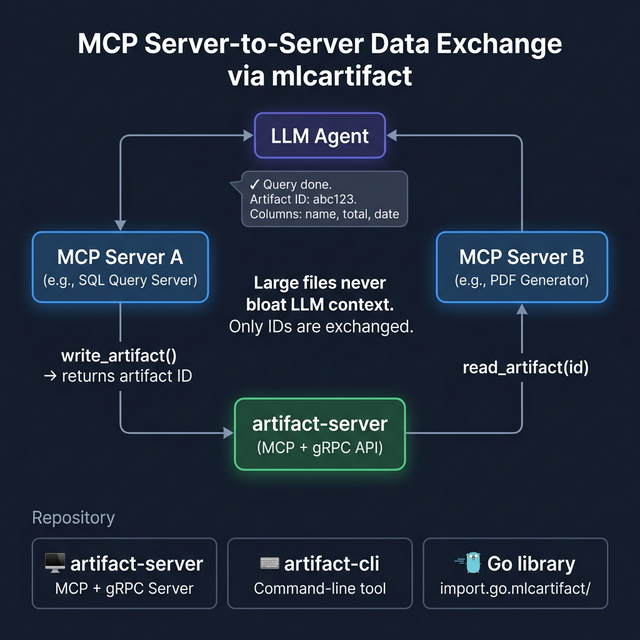
MCP Server A writes a 2 MB CSV to mlcartifact and returns only the artifact ID to the LLM. MCP Server B reads it directly — the large data never flows through the context window.
- Only IDs flow through the LLM — not the data itself
- Virtual File System with path-based lookup
- Surgical line-based patching for large files
Persistent Memory for the Agentic Era
MLC Artifact Service is more than just a storage backend. It provides a structured, hierarchical Virtual File System (VFS) designed specifically for AI agents, distributed tools, and complex automation workflows.
Why use MLC Artifact Service?
In many agentic systems, data is passed back and forth as large strings or flat files. MLC Artifact Service introduces a stable, path-based workspace:
- Hierarchical VFS: Organize artifacts into directories like
/projects/alpha/src/main.py. - Token Efficiency: Instead of re-uploading a 100KB file for a 1-line change, agents use VFSPatch for surgical edits.
- Protocol Agnostic: Whether you use MCP, gRPC, or the CLI, your data is accessible and consistent.
- Smart Lifecycles: Automatic TTL management ensures your storage doesn't clutter while allowing critical data to persist.
Who Is It For?
mlcartifact is primarily meant for local LLM setups, for example via Ollama, llama.cpp or LM Studio, and for custom harnesses. These usually have no built-in way for tools to hand files to each other: every intermediate result would have to pass through the model's context, which is exactly what is scarce and slow on local hardware.
Professional platforms such as Claude (Anthropic) or Gemini (Google) usually ship a comparable mechanism of their own, such as a sandbox with a file system or a files API. Large files stay outside the model's context between tool calls and never have to travel over the network to the model and back. If you use such a platform, check its built-in solution first. There, mlcartifact mainly pays off when your own MCP servers should exchange data directly through a shared store.
Key Tools
vfs_ls & vfs_find
Navigate your virtual workspace with full glob support and directory-style listing.
vfs_patch
Perform surgical updates. Append logs, replace specific code blocks, or update JSON metadata objects without high overhead.
Integrated MCP Prompts
The service comes with its own usage guidelines to "train" agents on how to best manage their persistent memory.
Getting Started
- Download the binary for your platform from the releases.
- Start the server:
./artifact-server - Connect via MCP to use it with your favorite LLM or via gRPC for your custom backend.
The server speaks MCP protocol 2026-07-28 over stdio, Streamable HTTP (/mcp) and, for older clients, SSE (/sse). Start it with -addr :8082 for HTTP mode.
Client Libraries
To let your own MCP servers write and read artifacts directly, there are clients for Go, TypeScript, Python and Rust. All of them cover the full API, including virtual paths, patch and find. Source code, examples and guides are in the GitHub repository:
- Go:
go get github.com/hmsoft0815/mlcartifact/client(guide) - TypeScript (Node, browser, edge): client-ts
- Python: client-python
- Rust: client-rust
Quick Setup (MCP)
Claude Desktop
Add the following to your claude_desktop_config.json:
{
  "mcpServers": {
    "mlc-artifact": {
      "command": "artifact-server"
    }
  }
}
Gemini-CLI
Add to your ~/.gemini/settings.json:
{
  "mcpServers": {
    "mlc-artifact": {
      "command": "artifact-server"
    }
  }
}
MCP-Tester
Add a new profile:
mcp-tester profile add artifact -c "artifact-server"