// PDF Server v0.4.0 BETA
PDF Server — HTML to PDF as a Service
// Gallery
// Features
Why choose PDF Server.
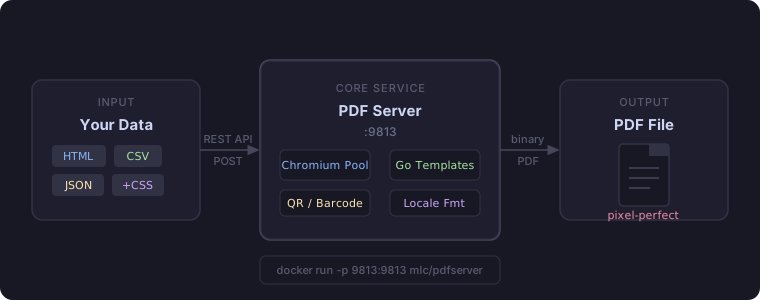
Pixel-perfect PDF rendering via headless Chromium — full CSS support including headers, footers, and page numbers.
Send JSON columns/rows or raw CSV data to generate styled table reports directly — no HTML templating required.
Native <qr-code> and <bar-code> HTML tags. Supports EAN-13, Code128, DataMatrix and more — rendered server-side.
Concurrent Chromium instance pool for high-throughput production workloads. Handles bursts without spin-up latency.
Single-command deployment with the provided Dockerfile. Includes Chromium — no external dependencies on the host.
Formats dates and numbers per locale. Go templates for dynamic content injection. REST API on port 9813.
A self-hosted Go microservice that converts HTML, CSV, and JSON data into production-quality PDFs using headless Chromium. Deploy via Docker or systemd — no cloud dependency, no per-page fees.
What it does
PDF Server exposes a REST API on port 9813. POST your HTML, structured JSON data, or a CSV file — and receive a pixel-perfect PDF. It manages a pool of Chromium instances internally for optimal throughput and zero cold-start latency. It also includes native server-side QR code and barcode rendering without external image dependencies.
Quickstart
Docker:
docker run -p 9813:9813 mlc/pdfserver
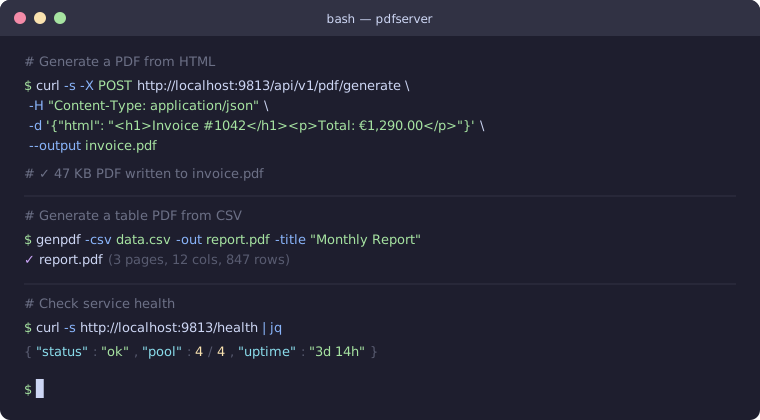
Generate a PDF from HTML (with embedded QR code):
curl -X POST http://localhost:9813/api/v1/pdf/generate \
  -H "Content-Type: application/json" \
  -d '{
    "html": "<h1>Invoice #1024</h1><p>Scan to verify:</p><qr-code width=\"3.5cm\">https://verify.example.com/1024</qr-code>"
  }' \
  --output invoice.pdf
Generate a PDF from CSV:
genpdf -csv data.csv -out report.pdf -title "Monthly Report"
Custom Components: QR Codes & Barcodes
PDF Server processes custom HTML tags server-side, converting them into crisp vector SVGs before rendering:
QR Codes (<qr-code>)
Embed QR codes anywhere in your HTML document:
<qr-code width="4cm" foreground="#0d6efd" background="#f8f9fa">https://example.com</qr-code>
Barcodes (<bar-code>)
Embed 1D and 2D industrial barcodes with automatic check digit calculation:
<bar-code type="ean13" width="6cm" height="2cm" show-text="true">4006381333931</bar-code>
<bar-code type="code128" width="7cm" height="2.2cm">INV-2026-0042</bar-code>
<bar-code type="datamatrix" width="3cm" height="3cm">PART-XYZ-9988</bar-code>
Supported Standards & Attributes
| Barcode Type | Description | Default Dimensions |
|---|---|---|
qr / <qr-code> |
2D QR Code | 3cm × 3cm |
datamatrix |
2D DataMatrix (square industrial) | 256px × 256px |
code128 |
Standard alphanumeric barcode (logistics/shipping) | 6cm × 2cm |
ean13 |
European Article Number (13 digits) | 6cm × 2cm |
ean8 |
Compact retail barcode (8 digits) | 5cm × 2cm |
upca |
North American retail barcode (12 digits) | 6cm × 2cm |
code39 |
Alphanumeric barcode | 6cm × 2cm |
itf |
Interleaved 2 of 5 (packaging) | 6cm × 2cm |
- Attributes:
type,width,height,foreground(color/hex),background,show-text(true/false),class,style. - CSS Units supported:
cm,mm,in,px,pt.
Direct Barcode Image Endpoint
Generate standalone barcode or QR code images directly (SVG or PNG) without generating a PDF:
# Fetch an SVG QR code
curl "http://localhost:9813/api/v1/pdf/barcode?type=qr&data=https://example.com&format=svg" -o qr.svg

# Fetch an EAN-13 barcode as PNG with text
curl "http://localhost:9813/api/v1/pdf/barcode?type=ean13&data=4006381333931&text=true&format=png" -o barcode.png
Structured Tables & Reports
The /api/v1/pdf/table/data endpoint generates styled reports directly from JSON columns and rows:
- Built-in Column Formats:
currency(e.g.1,200.50 €),number,percentage,date,datetime,qrcode,barcode-code128,barcode-ean13,barcode-ean8,barcode-datamatrix. - Column Alignment:
left,center,right. - Table Styling:
striped,bordered,compact, customizable header colors. - Timezones & Dates: Specify IANA timezones (e.g.
Europe/Berlin,UTC,America/New_York) and custom date formats.
API Endpoints
| Method | Path | Description |
|---|---|---|
POST |
/api/v1/pdf/generate |
HTML + CSS + Custom Tags → PDF |
POST |
/api/v1/pdf/table/data |
Structured JSON data (with barcodes & formatting) → Table PDF |
POST |
/api/v1/pdf/table/csv |
CSV data → Table PDF |
POST |
/api/v1/pdf/table/html |
HTML table fragment → Styled Table PDF |
GET |
/api/v1/pdf/barcode |
Direct Barcode / QR Code generator (SVG / PNG) |
GET |
/health |
Health check & browser pool status |
CLI Tools
genpdf— CLI tool to generate PDFs from HTML, JSON, or CSV files:# Convert structured JSON with barcodes to landscape PDF genpdf -json inventory.json -format A4-Landscape -out inventory.pdf # Convert CSV with German locale and timezone genpdf -csv sales.csv -delimiter ";" -locale de-DE -timezone "Europe/Berlin" -out sales.pdf # Debug intermediate HTML genpdf -json data.json -outhtml debug.htmlpdfctl— Service status and browser pool health monitoring.setup_browser— Pre-download the managed Chromium before first run (recommended on Windows).
Chromium Dependency
PDF Server requires Chromium to render PDFs. It is resolved automatically — no manual installation needed:
- System browser found — if Chrome or Chromium is already installed, it is used directly.
- Auto-download — if no system browser is found,
go-roddownloads a compatible Chromium build (~180 MB) into a local cache directory on first startup.
On Windows the cache lands in %LOCALAPPDATA%\rod\browser\. Run setup_browser.exe once after extracting the archive to pre-fetch it before the first request.
Docker users: Chromium is bundled in the image — nothing to do.
Supported Platforms
| Platform | How Chromium is provided |
|---|---|
| Docker | Bundled in image |
| Linux | System package (apt install chromium) or auto-download |
| macOS | System Chrome or auto-download |
| Windows | Auto-download via go-rod (~180 MB on first start) |