Chapter 2: Drawing shapes
npm install mlcroughOne renderer, one shape, one string:
import mlcrough from 'mlcrough';

const rc = mlcrough.svgString();
const svg = mlcrough.serialize(rc.circle(100, 100, 120));
svgString() gives you a renderer that produces abstract nodes; serialize()
turns them into text. The split is deliberate: anyone who would rather work with
the nodes — hang them into a larger document, add attributes — can reach them
without a detour through a string and back.
The shapes are line, rectangle, circle, ellipse, linearPath,
polygon, arc, curve and path. Each takes the same options object as its
last argument.
The two values that carry the look
roughness is the departure from the ideal line. 0 draws exactly, 1 is the
default, and above that it grows increasingly nervous.
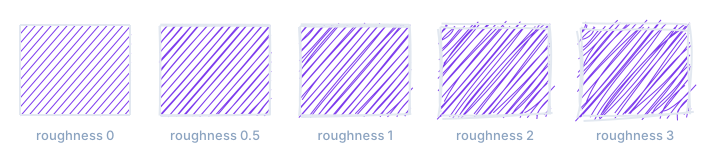
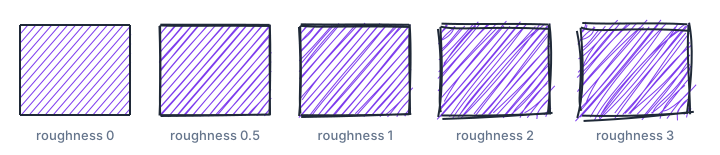
roughness. Past 2 it reads less as a sketch than as an unsteady hand.bowing is how much straight lines bend. And here sits a trap worth meeting
once: bowing is proportional to the length of the line. The value that gives
an 80-pixel edge a pleasant waver bends a 400-pixel axis into a visible arc. In
a diagram with short boxes and long axes you therefore need two values, not one
— chapter 3 shows how.
The seed
Given no seed, the library draws differently on every run. For a sketching tool that is the right default: drawing the same thing twice by hand does not produce the same thing twice.
The moment the output goes into a repository, a build or a manual, it is the
wrong one. A seed makes the drawing reproducible:
rc.rectangle(10, 10, 200, 120, { fill: '#7c3aed', seed: 42 });Same seed, same shape, same bytes. Every figure in this manual is made that way — otherwise each rebuild of the site would show a different picture and each commit a diff.
Further options
| Option | Effect |
|---|---|
stroke, strokeWidth |
Colour and width of the outline. stroke: 'none' leaves it out. |
fill, fillStyle |
Fill colour and fill style — see chapter 4. |
hachureAngle, hachureGap |
Angle and spacing of the hachure lines. |
fillWeight |
Line weight of the fill. Defaults to half of strokeWidth. |
strokeLineDash |
Dash pattern of the outline, as in SVG. |
preserveVertices |
Keeps corner points in place instead of wobbling those too. |
disableMultiStroke |
Draws each line once instead of twice. |
fixedDecimalPlaceDigits |
Decimal places in the output — smaller files. |
A renderer can be given its defaults once rather than repeating them per shape:
const rc = mlcrough.svgString({ options: { roughness: 1.4, seed: 7 } });