Chapter 4: Fills
A hand-drawn area is rarely one flat colour. It is hatched, cross-hatched, stippled — and which of those you pick decides more about the impression than the colour does.
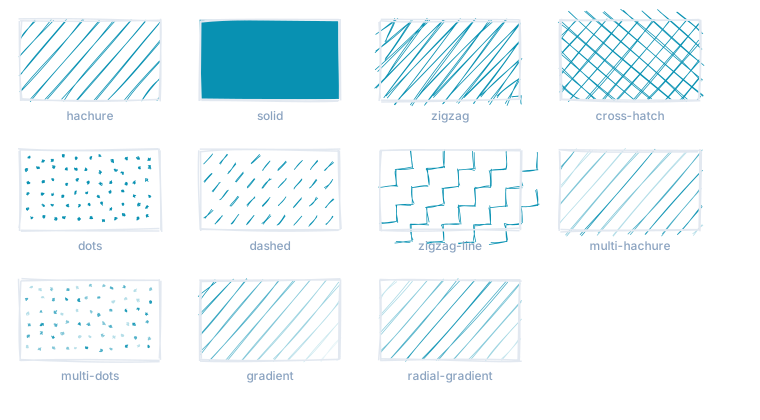
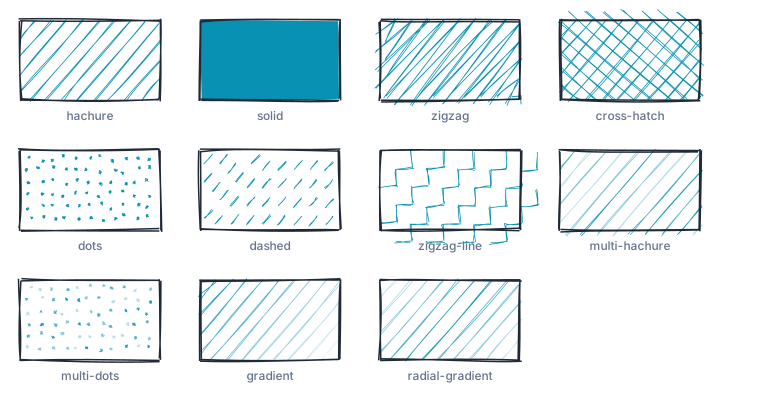
hachure is the default and the basic form: parallel lines at an angle. solid
fills through — not as a rectangle but as an area gone over once, so the edge
still wobbles. Everything in between varies the line work: zigzag and
zigzag-line run back and forth, cross-hatch lays a second hatching across,
dashed breaks up, dots and multi-dots stipple, multi-hachure overlays
several angles.
gradient and radial-gradient are not SVG gradients. They vary the opacity of
the hachure lines across the area — a gradient as a pen makes one, not as a
renderer makes one.
Three values that work together
hachureGap is the spacing of the lines, hachureAngle their angle,
fillWeight their weight.
fillWeight defaults to −1, which means: take half of strokeWidth. That is
right most of the time and wrong once — namely when the shape has no outline at
all. Charting libraries produce exactly that for their fill areas: fill set,
stroke: none. Before version 5.3.0 this yielded hachure of line width 0, so
the fill vanished. Since then the width keeps its value even when no outline is
drawn.
Hachure carries less colour than an area
A value that looks right as a translucent solid area — say 40% opacity — covers a fraction of that same area as hachure. Almost nothing of the impression survives.
So sketching a chart with filled areas means turning two knobs: stronger colours
in the source, and in the options a tighter hachureGap with a little more
fillWeight.
mlcrough.roughen(chart, { fillStyle: 'hachure', hachureGap: 5, fillWeight: 1.1 });What dots cost
dots and multi-dots draw a separate, itself hand-drawn ellipse per dot. At a
tight spacing that grows quickly: the figure above weighed 600 kB at
hachureGap: 6, and 165 kB at 12 — all the other styles together contribute
less than a tenth of that.
For one drawing on screen this does not matter; for a page full of them it does.
If you use dots over large areas, check the spacing and keep
fixedDecimalPlaceDigits low.
Gradients and patterns from the source document
If the source document holds a reference — fill="url(#gradient)" — hachure
cannot express it: every line would carry the whole gradient again. roughen()
recognises such fills and draws them as a single area with that reference. The
edge wobbles, the gradient survives.