Chapter 2: How LLMs Communicate
Before we dive into the code, we need to understand what a conversation with an LLM looks like technically. An LLM does not "think" in real time like a human it processes a sequence of messages.
The Three Classic Roles
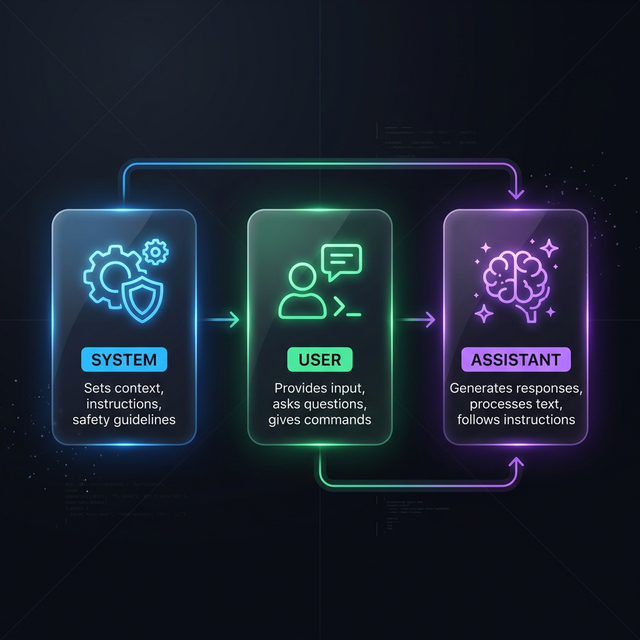
Every modern interaction with a model (such as GPT-4 or other SOTA models) consists of a list of messages, each assigned to a role:
- System Message (System Prompt): This is the "operating manual" for the model. It defines the identity: "You are a helpful assistant for data analysis. Always answer briefly and concisely." Rules and constraints are defined here too.
- User Message: This is input from the human. The question or the task: "How high is the CPU load?"
- Assistant Message (Assistant): The model's answer. It builds on the system prompt and all previous user messages. An assistant can reply with text or request a Tool Call (tool invocation).
The Fourth Role: The Tool
This is where MCP comes in. To complete the loop, one decisive fourth role was added:
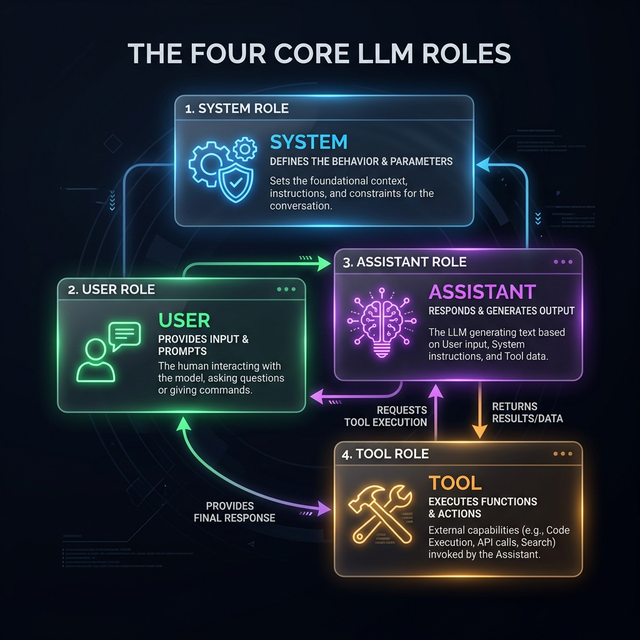
- Result Message (Tool):
This is the "response" of the MCP server to the model. When the assistant invokes a tool, the client executes it and sends the result back into the conversation with the role
tool. Without this fourth role, the model would never know what its call produced.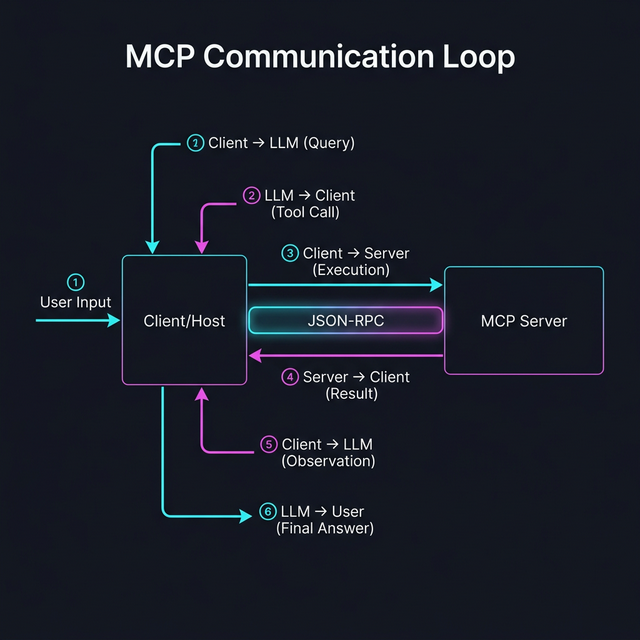
How Do Tools Reach the Model? (Tool Injection)
Out of the box, an LLM knows nothing about your MCP tools. The client (e.g., Claude Desktop or our mcp-tester) must first tell the model that these tools exist.
This process is called Injection. Before the actual user question is sent to the LLM, the client appends a hidden list of descriptions. In simplified form it looks like this:
System: You are an assistant. Available Tools:
get_cpu_usage: Returns the current CPU load. Parameters: none.add: Adds two numbers. Parameters:a(int),b(int).User: How high is the CPU load?
What the Request to the LLM Looks Like (JSON)
When a client (such as our tester) sends a request to a model, the JSON body for an API (e.g., OpenAI or Anthropic) looks approximately like this. Pay attention to how the MCP tool definitions are "injected" here:
{
  "model": "gpt-4",
  "messages": [
    { "role": "system", "content": "You are a helpful assistant." },
    { "role": "user", "content": "What is 10 + 20?" }
  ],
  "tools": [
    {
      "type": "function",
      "function": {
        "name": "add",
        "description": "Adds two numbers",
        "parameters": {
          "type": "object",
          "properties": {
            "a": { "type": "integer" },
            "b": { "type": "integer" }
          },
          "required": ["a", "b"]
        }
      }
    }
  ]
}
The Model's Response (Tool Call)
When the model recognizes that it needs a tool, it does not reply with text but with a call command:
{
  "role": "assistant",
  "tool_calls": [
    {
      "id": "call_abc123",
      "type": "function",
      "function": {
        "name": "add",
        "arguments": "{\"a\": 10, \"b\": 20}"
      }
    }
  ]
}
At this point, the LLM stops. It is now the MCP client's job to take this call, forward it to the MCP server, and insert the result back into the conversation history.
Sending the Result Back to the LLM
After the client has received the response from the MCP server, it sends a new request to the LLM. This one now contains the entire previous history PLUS the result of the tool call:
{
  "model": "gpt-4",
  "messages": [
    { "role": "system", "content": "You are a helpful assistant." },
    { "role": "user", "content": "What is 10 + 20?" },
    {
      "role": "assistant",
      "tool_calls": [
        {
          "id": "call_abc123",
          "type": "function",
          "function": { "name": "add", "arguments": "{\"a\": 10, \"b\": 20}" }
        }
      ]
    },
    {
      "role": "tool",
      "tool_call_id": "call_abc123",
      "content": "Result: 30"
    }
  ]
}
Only now does the model have all the information it needs to formulate the final answer for the user.
Tools and Instructions (Hand in Hand)
Important for understanding: the mere injection of tool definitions is often not enough. A good client or an MCP prompt (see Chapter 6) usually supplements the system prompt with explicit behavioral rules for these tools:
- "Always use the tool
addwhen the user asks a math question." - "Ask for permission before calling the tool
delete_file."
This combination of capability (tool) and instruction (prompt) makes MCP servers so remarkably precise and safe to use.
The Tool Call Loop
...
- Model -> Client: "I want to call
get_cpu_usage." (The model stops text generation here.) - Client -> MCP Server: The client executes the function on the server.
- MCP Server -> Client: The server returns the result (e.g.,
15%). - Client -> Model: The client sends a new message with the role tool back to the model: "Result of
get_cpu_usageis15%". - Model -> User: Only now does the model generate the final text: "The CPU load is currently at 15%."
MCP standardizes exactly this exchange between client and server so that the loop works identically for every tool and every model.
← Chapter 1: Introduction | Table of Contents | Next Chapter: Minimal MCP →
Copyright Michael Lechner - 2026-02-28