Chapter 21: User Queries & Elicitation - Human-in-the-Loop
In the previous chapters we saw how servers deliver data and how they can use a model themselves. Sometimes, though, a server needs something that is neither in the tool arguments nor allowed to come from a model: a decision made by the human. Should the deployment really go to production? Which of three matching customer accounts is meant? May the server connect to your GitHub account?
That is what elicitation is for (literally "drawing something out"; in practice: asking back). The server asks the client to put a question to the user – as a form or as a link to a web page – and continues working with the answer.
As of specification
2026-07-28: Elicitation itself is still part of the core, unchanged. What has changed is how the question reaches the client: the server no longer sendselicitation/createto the client as a separate request. Instead, it returns the question as the response to the running call; the client then repeats the call with the answer (Multi Round-Trip Requests, SEP-2322). This removes the error code-32042, theelicitationIdfield and thenotifications/elicitation/completenotification. Section 9 summarizes the differences from the previous version.
1. Why Not Just Let the Model Ask?
Without elicitation, a server only has a workaround: it replies with a text such as "Please ask the user whether they really want to deploy to production" and hopes the model passes the question on and brings the answer back correctly. That is weak for three reasons:
- Unreliable: The model may rephrase the question, forget it, or answer it itself.
- Unstructured: The answer comes back as free text; the server has to guess whether "yeah, go ahead" counts as consent.
- Not verifiable: There is no way to tell whether it really was the human who agreed.
Elicitation solves this: the server describes exactly what it wants to know, the client shows the question directly to the user (with input fields, drop-down lists, checkboxes), and the answer comes back structured and unambiguous – without a detour through the model.
2. How a Follow-up Question Works
Picture a counter at a public office. You hand in an application form. The clerk does not say "One moment, I'll call you back this afternoon" – they hand the form back to you with a note: "Please fill in field 7 and sign, then hand it in again." You fill it in and submit the same application again, this time complete.
That is exactly how MCP works since 2026-07-28:
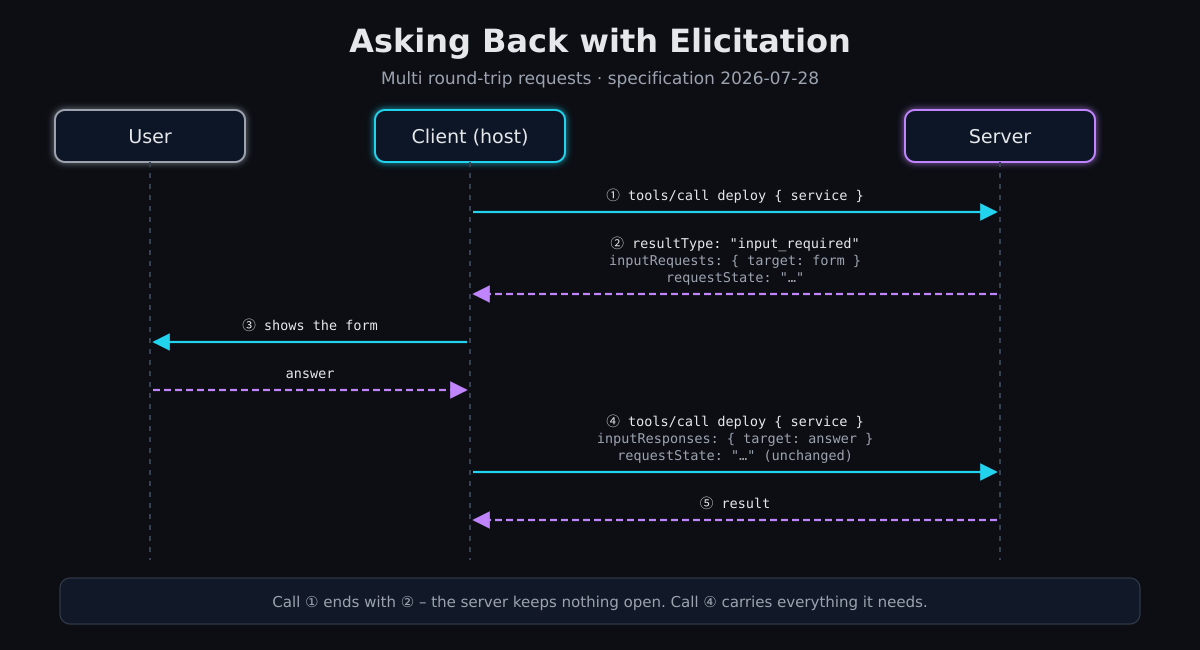
- The client calls a tool – completely normally.
- The server notices that something is missing and responds with
resultType: "input_required". The response contains the questions (inputRequests) and optionally arequestState– its "sticky note" for later. With that, this call is complete; the server is not waiting for anything. - The client shows the question to the user and collects the answer.
- The client calls the same tool with the same arguments again and attaches the answers (
inputResponses, under the same keys) as well as the unchangedrequestState. - Now the server has everything and returns the result – or, if necessary, asks the next question.
Here is what that looks like on the wire:
// ② Server's response to the first call
{
  "jsonrpc": "2.0", "id": 1,
  "result": {
    "resultType": "input_required",
    "inputRequests": {
      "target": {
        "method": "elicitation/create",
        "params": {
          "mode": "form",
          "message": "Roll out auth-service version 2.4.1 – where to?",
          "requestedSchema": {
            "type": "object",
            "properties": {
              "environment": { "type": "string", "title": "Target environment",
                "oneOf": [ { "const": "staging", "title": "Staging" },
                           { "const": "production", "title": "Production" } ],
                "default": "staging" },
              "confirm": { "type": "boolean", "title": "I have reviewed the changes" }
            },
            "required": ["environment", "confirm"]
          }
        }
      }
    },
    "requestState": "eyJzZXJ2aWNlIjoiYXV0aC1zZXJ2aWNlIiwidmVyc2lvbiI6IjIuNC4xIi…"
  }
}

// ④ Client's repeated call – new id, same arguments, plus the answer
{
  "jsonrpc": "2.0", "id": 2, "method": "tools/call",
  "params": {
    "name": "deploy",
    "arguments": { "service": "auth-service" },
    "inputResponses": {
      "target": { "action": "accept", "content": { "environment": "production", "confirm": true } }
    },
    "requestState": "eyJzZXJ2aWNlIjoiYXV0aC1zZXJ2aWNlIiwidmVyc2lvbiI6IjIuNC4xIi…"
  }
}
Why So Roundabout?
At first glance, the "call back" approach of the previous version seems more natural: the server kept the call open, sent its own request to the client and waited. But that came at a price: the server had to remember the half-finished call, the connection had to stay open the entire time, and behind a load balancer the answer had to land at exactly the instance that was waiting.
With the new approach, every call is self-contained. The repeated call contains everything the server needs: the original arguments, the answers and the sticky note. Any server instance can handle it – even one that never saw the first round. This is the foundation for stateless MCP servers that scale freely.
The Sticky Note `requestState`
Often the server does not need a sticky note at all – the arguments come back with the second call anyway. requestState becomes useful when the server determined something in round 1 that must still hold in round 2. In the example: the user confirms "roll out version 2.4.1". If version 2.4.2 appears in the meantime, the server must not simply roll out the latest version – 2.4.1 is what was confirmed. So the server writes the version into the requestState.
Important: the requestState travels through the client. For the server, it is therefore input it must not trust. As soon as it influences decisions, the server has to protect it against tampering (HMAC or AEAD) and check it when it comes back: Is the signature valid? Does it belong to exactly this request and this user? Has it not yet expired? The client may neither read nor modify the content – it just returns it exactly as received.
Where Follow-up Questions Are Allowed
A server may respond with input_required to tools/call, prompts/get and resources/read – nowhere else. And it may only ask questions the client supports: the client declares this in _meta on every request:
"_meta": {
  "io.modelcontextprotocol/clientCapabilities": {
    "elicitation": { "form": {}, "url": {} }
  }
}
An empty "elicitation": {} means: forms only. If elicitation is missing entirely, the server must not ask a follow-up question and has to manage without one.
3. Form Mode (`form`)
In form mode, the server describes the requested input with a simplified JSON Schema. The client builds a form from it.
So that every client can render it, the schema is deliberately simple: a flat object with simple fields – no nested objects, no lists of objects.
| Field type | Schema | Typical rendering |
|---|---|---|
| Text | "type": "string", optionally minLength, maxLength, format (email, uri, date, date-time) |
Input field |
| Number | "type": "number" or "integer", optionally minimum, maximum |
Number field |
| Yes/No | "type": "boolean" |
Checkbox |
| Choice (single) | "type": "string" with enum – or oneOf with const + title for readable labels |
Drop-down, radio buttons |
| Choice (multiple) | "type": "array" with items.enum or items.anyOf, optionally minItems, maxItems |
Checkbox list |
Every field can have a title, a description and a default; clients should pre-fill default values.
Never ask for passwords or keys via a form. Whatever is entered into the form is visible to the client – and therefore possibly to the model, to logs and to intermediaries. The specification therefore explicitly forbids asking for passwords, API keys, access tokens or payment data in form mode. That is what URL mode is for. Name, email address or username, on the other hand, are allowed – the user sees the question and can decline.
4. URL Mode (`url`)
Some input must never touch the client at all: the password for a third-party system, a credit card number, the approval in an OAuth dialog. In URL mode, the server therefore sends only a link. The user does the actual input in the browser, directly on a page of the server or the third-party provider.
{
  "method": "elicitation/create",
  "params": {
    "mode": "url",
    "message": "Please connect your GitHub account so I can create issues.",
    "url": "https://mcp.example.com/connect/github"
  }
}
The flow, typically for connecting to a third-party service:
- A tool needs access to GitHub, but the server does not yet have a token for this user. It responds with a URL follow-up question and a
requestState. - The client shows the user the full URL and asks for permission to open it.
- The user agrees; the client opens the link in the browser and repeats the tool call with
"action": "accept". - In the browser, the user signs in to GitHub and grants access. The server receives the token and stores it for this user.
- On the repeated call, the server checks via
requestStateor its token store whether the connection is in place. If so, it runs the tool; if not, it asks the follow-up question again.
Two things are easy to misunderstand:
acceptonly means "the user opened the link", not "the process is done". The client never learns what happens in the browser. Only the server knows whether it worked.- URL mode is not for signing in to the MCP server itself. That is handled by MCP authorization (Chapter 17). URL mode is for credentials the server needs towards third parties. The server never passes these credentials on to the client.
Security Rules in URL Mode
A link generated by someone else is a classic attack vector. The specification therefore sets clear rules:
| Server | Client |
|---|---|
| do not put personal data or credentials into the URL | never open or prefetch the URL automatically |
| no "pre-authenticated" links that grant access on their own | show the full URL and ask for consent before opening |
| use HTTPS (except during development) | highlight the domain, warn about suspicious addresses (e.g. Punycode) |
| verify that the same user opens the link who triggered the follow-up question | open the link in a way that neither client nor model can read the input |
The last server rule prevents a concrete attack: Alice triggers a connection follow-up question but sends the link to Bob. Bob innocently signs in to GitHub – and Bob's token ends up in Alice's account. That is why the link points to a dedicated page on the server (/connect/github) that first checks whether the signed-in browser user is the same as the MCP user, and only then redirects to GitHub.
5. The Three Possible Answers
Every follow-up question ends with exactly one of three answers:
action |
Meaning | content |
Sensible server reaction |
|---|---|---|---|
accept |
User confirmed or submitted | Form: the input; URL: empty | continue working |
decline |
User explicitly refused ("No") | empty | abort, offer an alternative if appropriate |
cancel |
User closed the dialog without deciding | empty | abort, ask again later |
decline and cancel are not errors. The user made a legitimate decision; the tool should return a normal result ("Deployment not started"), no isError and certainly no JSON-RPC error. And: a server must never rely on a follow-up question being answered – the client may simply not repeat the call.
6. Implementation in Go
The official go-sdk supports the new flow starting with v1.8.0. In round 1, a tool handler returns a CallToolResult with InputRequests (and optionally RequestState); in round 2, it finds the answers in req.Params.InputResponses and the sticky note in req.Params.RequestState. The following example is the deploy tool from section 2 – complete and runnable.
package main

import (
	"context"
	"crypto/hmac"
	"crypto/sha256"
	"encoding/base64"
	"encoding/json"
	"errors"
	"fmt"
	"log"
	"os"
	"strings"
	"time"

	"github.com/modelcontextprotocol/go-sdk/mcp"
)

// Secret key known only to the server – so the client cannot forge requestState.
var stateKey = []byte(os.Getenv("DEPLOY_STATE_KEY"))

type DeployIn struct {
	Service string `json:"service" jsonschema:"Name of the service"`
}

// deployState travels through the client between round 1 and round 2.
type deployState struct {
	Service string    `json:"service"`
	Version string    `json:"version"` // the version the user confirms
	Expires time.Time `json:"exp"`
}

func latestVersion(service string) string { return "2.4.1" } // placeholder: ask the build system

func deploy(ctx context.Context, req *mcp.CallToolRequest, in DeployIn) (*mcp.CallToolResult, any, error) {
	answer, answered := req.Params.InputResponses["target"].(*mcp.ElicitResult)

	// Round 1: no answer yet – ask the follow-up question and pass the state along.
	if !answered {
		version := latestVersion(in.Service)
		state, err := sign(deployState{Service: in.Service, Version: version, Expires: time.Now().Add(10 * time.Minute)})
		if err != nil {
			return nil, nil, err
		}
		return &mcp.CallToolResult{
			InputRequests: mcp.InputRequestMap{"target": &mcp.ElicitParams{
				Mode:    "form",
				Message: fmt.Sprintf("Roll out %s version %s – where to?", in.Service, version),
				RequestedSchema: map[string]any{
					"type": "object",
					"properties": map[string]any{
						"environment": map[string]any{
							"type": "string", "title": "Target environment",
							"oneOf": []map[string]any{
								{"const": "staging", "title": "Staging"},
								{"const": "production", "title": "Production"},
							},
							"default": "staging",
						},
						"confirm": map[string]any{"type": "boolean", "title": "I have reviewed the changes"},
					},
					"required": []string{"environment", "confirm"},
				},
			}},
			RequestState: state,
		}, nil, nil
	}

	// Round 2: the answer is here. Declining or dismissing is not an error.
	if answer.Action != "accept" {
		return text("Deployment not started (" + answer.Action + ")."), nil, nil
	}
	var st deployState
	if err := verify(req.Params.RequestState, &st); err != nil {
		return nil, nil, err
	}
	if st.Service != in.Service || time.Now().After(st.Expires) {
		return nil, nil, errors.New("requestState does not match this request or has expired")
	}
	if confirm, _ := answer.Content["confirm"].(bool); !confirm {
		return text("No deployment without confirmation."), nil, nil
	}
	env, _ := answer.Content["environment"].(string)
	return text(fmt.Sprintf("Rolling out %s %s to %s.", st.Service, st.Version, env)), nil, nil
}

// sign packs the state as "payload.signature" (HMAC-SHA256). Readable, but not forgeable.
func sign(v any) (string, error) {
	b, err := json.Marshal(v)
	if err != nil {
		return "", err
	}
	m := hmac.New(sha256.New, stateKey)
	m.Write(b)
	return base64.RawURLEncoding.EncodeToString(b) + "." + base64.RawURLEncoding.EncodeToString(m.Sum(nil)), nil
}

func verify(s string, v any) error {
	payload, mac, ok := strings.Cut(s, ".")
	if !ok {
		return errors.New("requestState is missing")
	}
	b, err1 := base64.RawURLEncoding.DecodeString(payload)
	sig, err2 := base64.RawURLEncoding.DecodeString(mac)
	if err1 != nil || err2 != nil {
		return errors.New("requestState is corrupted")
	}
	m := hmac.New(sha256.New, stateKey)
	m.Write(b)
	if !hmac.Equal(sig, m.Sum(nil)) {
		return errors.New("requestState has been tampered with")
	}
	return json.Unmarshal(b, v)
}

func text(s string) *mcp.CallToolResult {
	return &mcp.CallToolResult{Content: []mcp.Content{&mcp.TextContent{Text: s}}}
}

func main() {
	if len(stateKey) < 32 {
		log.Fatal("DEPLOY_STATE_KEY must be at least 32 characters long")
	}
	s := mcp.NewServer(&mcp.Implementation{Name: "deployer", Version: "1.0.0"}, nil)
	mcp.AddTool(s, &mcp.Tool{
		Name:        "deploy",
		Description: "Rolls out a service. Asks the user for the target environment and confirmation.",
	}, deploy)
	if err := s.Run(context.Background(), &mcp.StdioTransport{}); err != nil {
		log.Fatal(err)
	}
}
A few points that are easy to overlook:
- The handler runs twice. Everything before the follow-up question happens in both rounds – so expensive or consequential steps belong after the follow-up question.
- An HMAC makes the state tamper-proof, not secret. The client can read the version in the
requestState. If it should not, encrypt with AEAD (e.g. AES-GCM). - For remote servers, the user belongs in the state. Here the server runs locally over stdio. A server with sign-in additionally writes the user ID (such as the
subclaim) into therequestStateand checks it in round 2 – otherwise another user could reuse someone else's state. - Older clients: If the client still speaks a protocol version before
2026-07-28, the go-sdk automatically translates theInputRequestsinto a classicelicitation/createrequest to the client and then calls the handler again with the answer. The handler does not need to do anything for this.
7. Follow-up Questions in Long-Running Tasks
If a tool runs as a task (Chapter 19), the follow-up question works the same in principle, just via different methods: the task switches to the status input_required, the question is in inputRequests of the tasks/get response, and the client answers with tasks/update. The difference: the task is not restarted but waits for the answer and then continues. A requestState is not needed there, because the task holds its own state.
Rule of thumb: if the server needs the answer before it even starts, it asks via the normal follow-up path. If the question comes up in the middle of a long piece of work, it belongs in the task.
8. Testing Elicitation with `mcp-tester`
mcp-tester (Chapter 14) plays the client: it detects input_required, answers the question with a predefined answer and repeats the call automatically.
On the command line, you pass the answer with --elicit (accept, decline, cancel, or accept:{…} with content; can be given multiple times for multiple questions). The tester declines unanswered questions. This is the output for the example from section 6:
$ mcp-tester call deploy -c ./deployer --args '{"service":"auth-service"}' \
    --elicit 'accept:{"environment":"production","confirm":true}'
[ELICIT] Roll out auth-service version 2.4.1 – where to? → accept {"confirm":true,"environment":"production"}
Content 0 (Text):
Rolling out auth-service 2.4.1 to production.

$ mcp-tester call deploy -c ./deployer --args '{"service":"auth-service"}' --elicit decline
[ELICIT] Roll out auth-service version 2.4.1 – where to? → decline
Content 0 (Text):
Deployment not started (decline).
In test scripts, elicit_response sets the answers before the call; assert_elicited checks what was asked:
elicit_response accept '{"environment": "staging", "confirm": true}'
call_tool deploy service:"auth-service"
assert_elicited "version 2.4.1"
assert_contains "to staging"

elicit_response decline
call_tool deploy service:"auth-service"
assert_contains "not started"
Saved as deploy.mcp, the script runs with mcp-tester test -s deploy.mcp -c ./deployer; all seven steps pass. This way, all three answers – and the question itself – can be checked automatically in CI (Chapter 15).
9. Migration from `2025-11-25`
2025-11-25 |
2026-07-28 |
|---|---|
Server sends elicitation/create to the client as a separate request and waits |
Server responds with resultType: "input_required" + inputRequests; client repeats the call with inputResponses |
Capability elicitation declared once during connection setup |
Capability in _meta of every request |
Error -32042 (URL elicitation required) when a tool can only run after a login |
removed – replaced by a URL follow-up question in the input_required result |
elicitationId and notifications/elicitation/complete to signal completion of a URL follow-up question |
removed – the server detects completion on the repeated call (via requestState or its own store) |
| State between question and answer lives in the waiting server | State travels along as requestState or lives in a store that every instance can reach |
10. Common Mistakes
| Mistake | Consequence | Solution |
|---|---|---|
| Asking for a password or API key via a form | Secret ends up in the client, possibly in the model context and in logs | Use URL mode |
Treating decline/cancel as an error |
Model mistakes the user's deliberate decision for a defect and tries again | Return a normal result with a clear statement |
Accepting requestState unchecked |
Client can manipulate version, target or user | HMAC/AEAD, expiry time, binding to request and user |
| Consequential action before the follow-up question | Gets executed in round 1 and round 2 | Ask first, then act |
| Follow-up question to a client without the matching capability | Client cannot render the question | Check the capability in _meta; no URL follow-up question without url |
| URL follow-up question without user verification on the target page | Another user connects their account to the wrong MCP user | Target page checks that browser user and MCP user are identical |
Conclusion
Elicitation closes the gap between server, AI and human: the server asks precisely, the human answers unambiguously, and the model does not have to relay anything. With 2026-07-28, the follow-up question has become an ordinary second call – a little more back and forth on the wire, but without open connections and with servers that no longer have to hold on to state.
← Chapter 20: Agentic Servers & Sampling | Table of Contents | Next Chapter: Choosing the Right Programming Language →
Copyright Michael Lechner – 2026-10-09 (Rewritten for specification 2026-07-28: multi round-trip requests, URL mode, tested Go example)