MCP server
Image processing as a tool for AI agents. OpticScript ships a Model Context Protocol server. Connect Claude, Gemini or your own agent to it and you are not handing it a handful of fixed filters — you are handing it the whole scripting engine: the model writes an OpticScript script and runs it.
The difference is not one of degree. An MCP server exposing resize,
crop and blur can do three things. This one can do anything you can
express in OpticScript, and the model combines it itself.
What you can ask
You ask in plain language — the agent picks the tools. The examples below are real runs through the MCP server, on a folder of five holiday photos; the numbers come from those runs.
"Which photos in my holiday folder are duplicates?"
The agent calls image_hash on every file. Result: two pairs.
IMG_4711.jpg and see_klein.jpg are the same picture — the copy is
half the size and recompressed, the distance still 0 bits.
cafe.webp and cafe (Kopie).webp likewise. The other photos are
30–33 bits apart, so different pictures.
"Get the lake photos ready for the web: WebP, long side 1200 pixels —
and the location must not go online."
One run_script with three lines (resize, unsetMeta("exif.GPSInfo"),
save as WebP), then read_exif to check. 1600×1067 and 393,718 bytes
become 1200×800 and 108,220 bytes, 73 % smaller. The GPS
coordinates are gone, copyright and camera data stay. If you don't
mention the location, it stays in the file — worth saying.
"Add me as the photographer and the copyright to the café pictures."
run_script with mergeMeta("exif", { Artist, Copyright });
read_exif confirms: photographer "Anna Beispiel", copyright "© 2026
Anna Beispiel — alle Rechte vorbehalten".
"Mark the lake photo with my id AB-2026." — and weeks later:
"Does this picture carry an id?"
run_script with img.mark("AB-2026"), later img.readMark() on a
copy a platform cropped square, resized to 640 pixels and recompressed:
found, AB-2026. On the winter photo: no id. More under
Copyright protection — marking is Pro, checking free.
"Which photo is the sharpest, and are highlights blown anywhere?"
analyze_image on each picture, no script needed. The lake photo is by
far the sharpest (sharpness 0.027), the winter one 0.005, the café
photo 0.0008 — soft-focus, the worst choice for a large print. Blown
highlights: none above 0.04 % of the area.
And a programming task
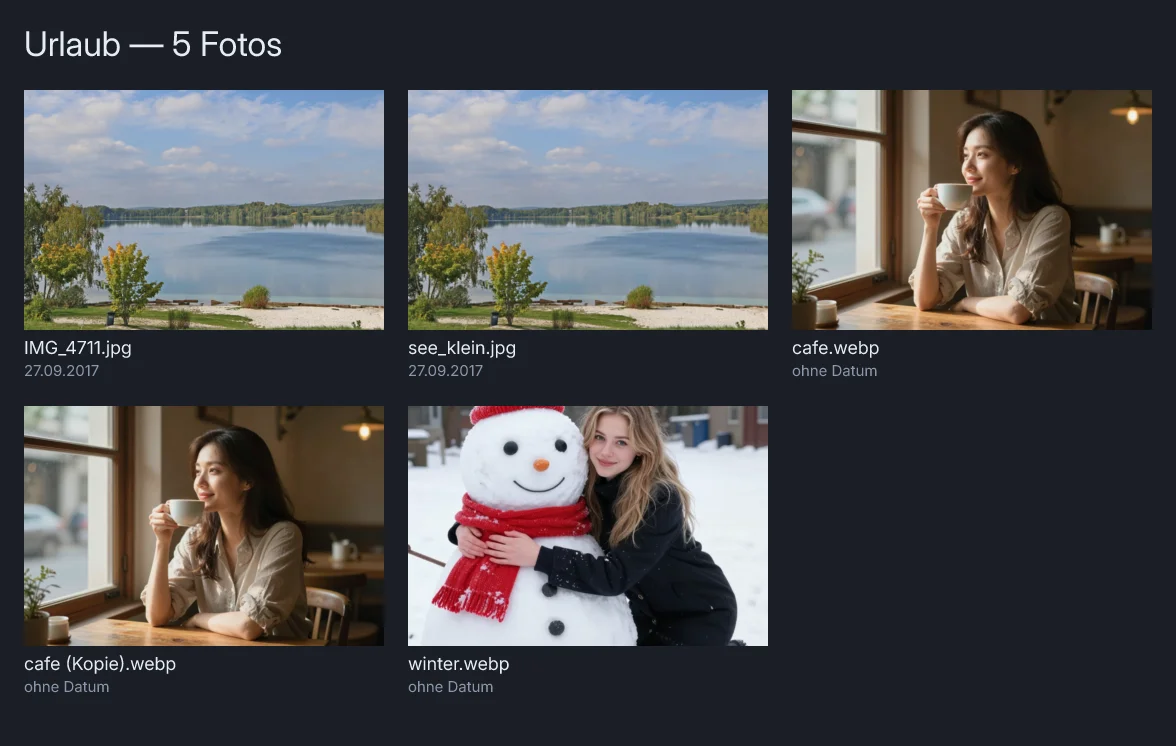
"Make me a contact sheet of all photos in the folder, with file name and capture date under each picture."
There is no ready-made tool for that — the agent writes the script
itself: looks up drawText and blendAt with get_api_reference,
checks the draft with validate_script and runs it with five inputs.
It passes the file names as a parameter, because over MCP the pictures
arrive as data, not as files.
keys.forEach((key, i) => {
  const img = Engine.loadImage(key);
  const s = Math.max(TW / img.width, TH / img.height);       // fill the tile
  const cw = Math.round(TW / s), ch = Math.round(TH / s);
  img.crop(Math.round((img.width - cw) / 2), Math.round((img.height - ch) / 2), cw, ch).resize(TW, TH);
  sheet.blendAt(img, px(x, y), 1.0, Blend.Over);
  const raw = img.getMeta("exif")?.DateTimeOriginal;          // "2017:09:27 14:08:55"
  const date = raw ? raw.slice(0, 10).split(":").reverse().join(".") : "ohne Datum";
  sheet.drawText(names[i], x, y + TH + 24, { size: 18, color: "#e6edf3" });
  sheet.drawText(date,     x, y + TH + 46, { size: 15, color: "#8b98a9" });
});
Excerpt; the whole script (30 lines) is in the repository at
mlcprodweb/scripts/mcp_example_kontaktbogen.js. Lake photo: W. Bulach,
CC BY-SA 4.0.
The ten tools
Changing images
| Tool | What for |
|---|---|
run_script |
Run an OpticScript script. //!INPUT: keys map to image files, //!OUTPUT: lands on disk. A script that only measures and answers through console.log needs no output file at all. |
validate_script |
Syntax check without executing and without input images. Returns ok or the error with line and column. |
Measuring images — new in 2.5.1, for a simple reason: "is this photo sharp" is not image editing. Before these, a model had to write a script for it and invent a throwaway output image.
| Tool | What for |
|---|---|
analyze_image |
Dimensions, format, per-channel brightness and spread, sharpness, crushed shadows and blown highlights, transparency, histogram, dominant colours, perceptual hash, EXIF — in one call. |
compare_images |
MSE, PSNR, MAE, largest single difference, how many pixels differ, hash distance. Answers "did my output change" and "is this JPEG quality enough". |
read_exif |
Camera, lens, capture time, orientation, exposure, aperture, ISO, focal length, GPS — plus the provenance our own runs stamp in. |
image_hash |
Perceptual hash of several files with the bit distance to the first. Finds duplicates, survives rescaling and re-encoding. |
image_info |
Just dimensions, format and byte size — without loading the image into the engine. |
Finding your way
| Tool | What for |
|---|---|
get_api_reference |
The JS API reference, optionally filtered by a search term. |
list_examples |
List the bundled example scripts. |
get_example |
Fetch one example's source. |
Plus a resource (opticscript://skills) carrying the full scripting
guide, and two prompts: author_script writes a script for a
described task, fix_script works a broken one against the real API.
Why the order matters
The tools alone are not enough for a model. Without guidance it writes plausible-looking JavaScript using methods that sound like a different imaging library — and the engine does not know them.
That is why the order lives in the author_script prompt:
- Read the guide (
opticscript://skills) — the full API, the memory rules, the common pitfalls. - Declare the directives —
//!INPUT:,//!OUTPUT:,//!PARAM:. validate_script— the syntax check needs no input images and costs nothing.- Only then
run_scriptwith the real paths.
Anyone wiring up the server should know about that prompt. It is the difference between "the model guesses" and "the model delivers".
Wiring it up
The server speaks stdio and ships as mlcos-mcp.
Claude Desktop
Edit the file, then restart Claude Desktop:
- Windows —
%APPDATA%\Claude\claude_desktop_config.json - macOS —
~/Library/Application Support/Claude/claude_desktop_config.json - Linux —
~/.config/Claude/claude_desktop_config.json
{
  "mcpServers": {
    "mlc-opticscript": {
      "command": "C:\\Program Files\\MLC OpticScript\\mlcos-mcp.exe",
      "args": ["-root", "C:\\Users\\me\\Pictures"]
    }
  }
}
On macOS the path points into the app bundle:
{
  "mcpServers": {
    "mlc-opticscript": {
      "command": "/Applications/MLC OpticScript.app/Contents/MacOS/mlcos-mcp",
      "args": ["-root", "/Users/me/Pictures"]
    }
  }
}
An absolute path is required: Claude Desktop does not start the server in your project directory, and a relative command fails without a visible message.
Claude Code
claude mcp add mlc-opticscript -- /path/to/mlcos-mcp -root ~/Pictures
What -root does
It pins the directory that documentation and example scripts are read from, and doubles as the natural working folder for input and output files. Without it the server walks up from the working directory — which, on a client's desktop, rarely ends up where your images are.
It is built on the MCP organisation's official Go SDK and speaks
protocol version 2026-07-28. Every file it produces carries
provenance in its metadata — engine version, timestamp and
via=mlcos-mcp — so it stays traceable which run created it.
What a session looks like
An agent asked to "turn this screenshot into a framed thumbnail" typically goes:
analyze_imageon the file — how big, how bright, does it have transparency?get_api_referencewithquery: "resize"— what is the method actually called?validate_scripton the draft — does the syntax hold?run_scriptwith input and output paths.compare_imagesbetween input and result — did anything happen at all, and how much?
Five calls, and not one of them a guess. Step 5 is the new one: a model can check its own result instead of asserting it.
See also
- Team server — one server for the whole team, images by id through an artifact store.
- First steps — install and the JS engine tour.
- API reference — every
Engine.*method. - Examples — 70+ working scripts.
- Command line tools — the same measurements without an agent.