Team server
One machine runs the engine, the whole team uses it. The OpticScript MCP server does not have to run on every desk. Start it once, on a fast machine on your network, and every workstation's agent (Claude Code, Claude Desktop, your own) gets the same engine, the same version and the same fonts. Images travel as an id, not as base64 through the model.
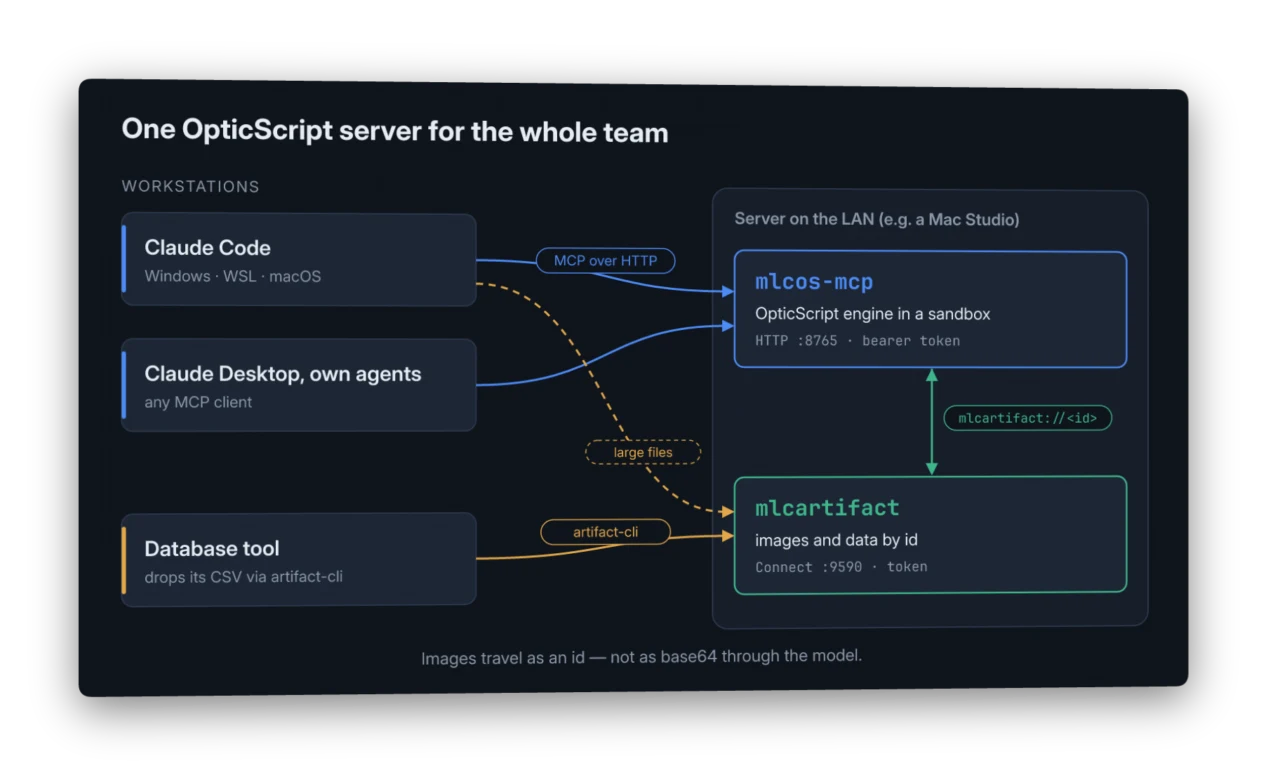
Two pieces on the server
mlcos-mcp— the OpticScript MCP server, this time over HTTP instead of stdio. It runs every script in a sandbox and wants a bearer token.- mlcartifact — a small store for files. A client puts an image in, gets an id back, and hands the model only that id. Results land there too.
Your workstations need nothing but an MCP client. For files that live on
the workstation there is artifact-cli, a single binary that uploads and
downloads.
Why ids and not base64
A model can pass an image to a tool as base64. For an icon that is fine. For a photo it is not: the model has to write every character into the tool call, and back comes the result the same way.
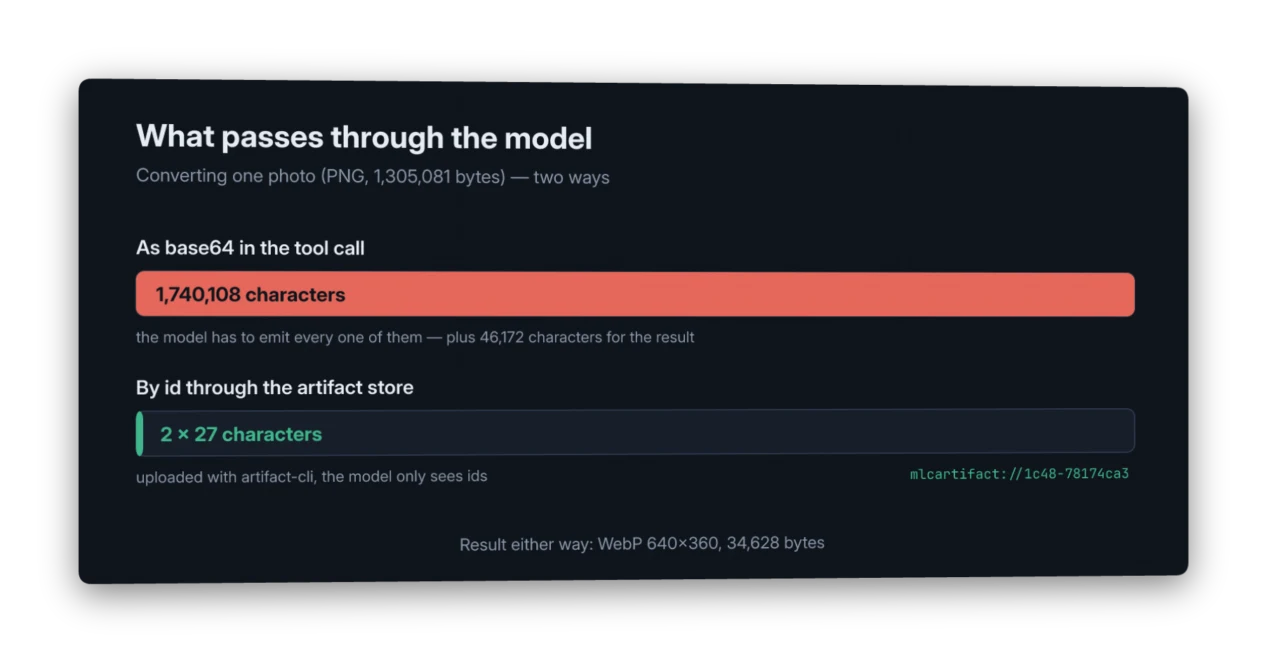
With the store in between, the model sees mlcartifact://1c48-78174ca3
going in and another id coming out. The pixels never pass through the
context.
What it looks like
A real run from a Windows workstation (Claude Code in WSL). The task was to convert a local 1.3 MB PNG to a 640 px WebP; the prompt below is shortened, everything else is as it happened:
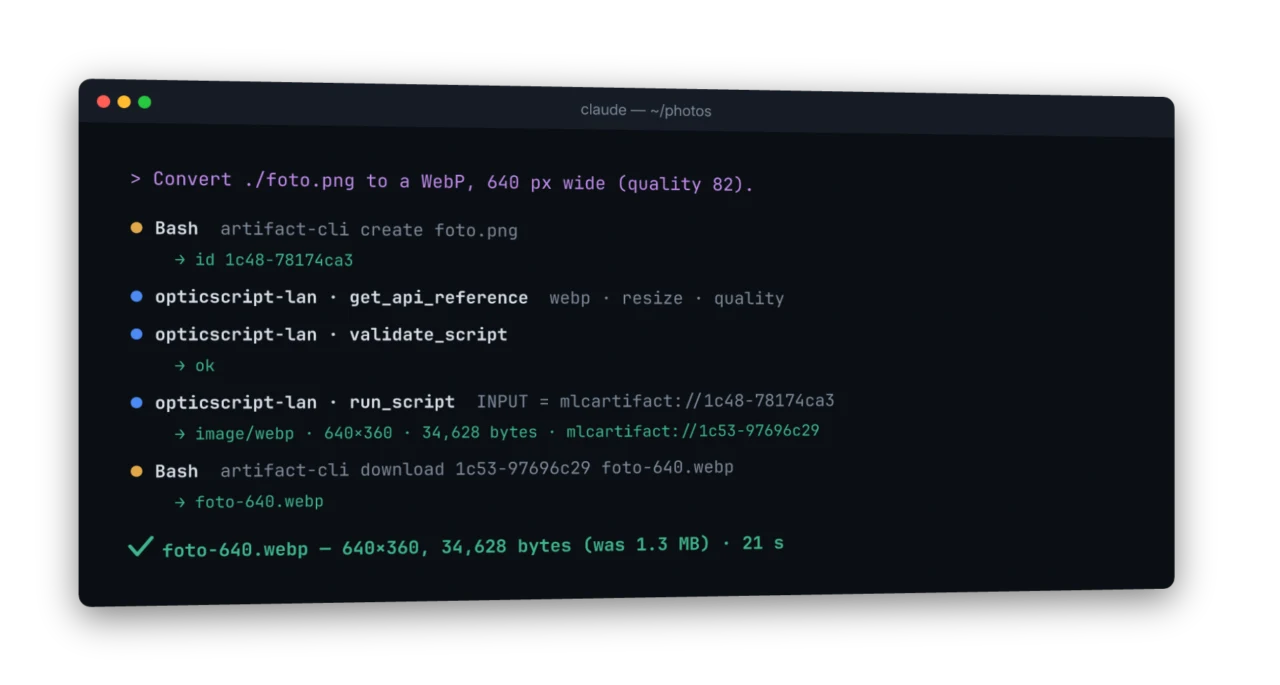
Nine turns, 21 seconds, and the script ran on the first attempt: the
model checked it with validate_script before calling run_script.
run_script reports width and height of every output, so there was no
second call just to measure the result.
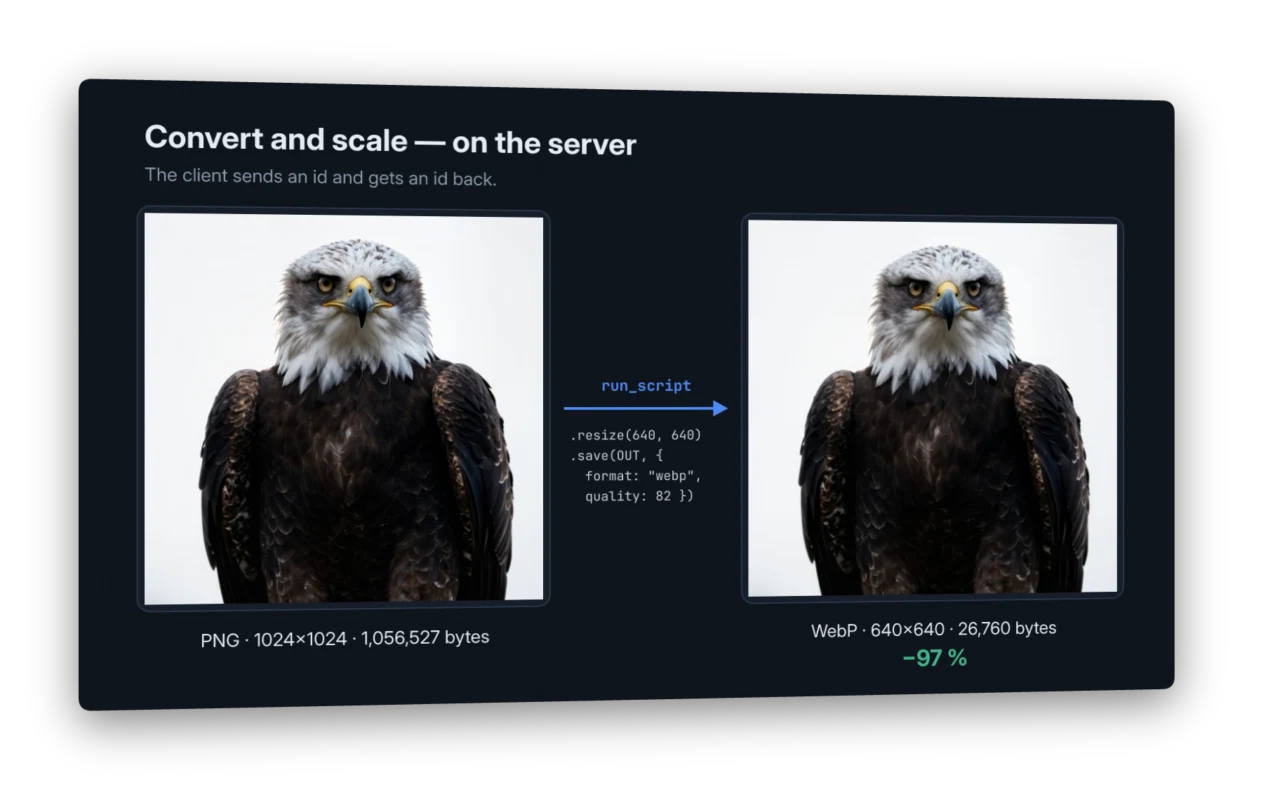
The conversion itself is one line of OpticScript. Here with the eagle from the samples:
Data from elsewhere
The store is not only for images. A database tool can drop its query result as CSV, and a script gets the id as a parameter and turns it into a chart:
//!PARAM: DATA:string=
//!OUTPUT: CHART
const rows = Engine.parseCSV("mlcartifact://" + DATA);
// … draw the chart …
chart.save(CHART);        // → mlcartifact://<new id> in the result
Every loader reads from the store — Engine.loadImage, parseCSV,
parseJSON, readText, loadSVG. Engine.writeArtifact(name, imageOrText)
stores a result and returns its id.
Setting it up
A team server needs an Enterprise licence — the 30-day evaluation unlocks it too. On the server, as the account the services run under:
mlcos-license activate <KEY> --name "First Last"
mlcos-license status        # what is unlocked, until when
Without a matching licence mlcos-mcp refuses to start on the network
and names exactly this command. Then:
# the store — token required, even from the same machine
ARTIFACT_GRPC_TOKEN=<store-token> artifact-server \
    -grpc-addr 0.0.0.0:9590 -addr 127.0.0.1:9591 -require-token-localhost

# the engine
MLCOS_MCP_TOKEN=<secret> MLCOS_ARTIFACT_TOKEN=<store-token> \
  mlcos-mcp -addr 0.0.0.0:8765 \
    -artifacts http://127.0.0.1:9590 -artifact-user team
On each workstation:
claude mcp add --scope user --transport http opticscript \
    http://<server>:8765/mcp --header "Authorization: Bearer <secret>"
For artifact-cli, set ARTIFACT_GRPC_ADDR=<server>:9590,
ARTIFACT_GRPC_TOKEN=<store-token> and ARTIFACT_USER_ID=team. Then
artifact-cli create photo.png prints the id, and
artifact-cli download <id> result.webp fetches a result.
On macOS both run fine as LaunchAgents, on Linux as systemd units.
Safe by default
Whoever reaches the server sends code. So:
- A token is required as soon as the server listens beyond
loopback; without one it refuses to start.
-addr :8765without a host means127.0.0.1. - Scripts run in a sandbox: no file paths — neither from the caller
nor inside the script. Inputs, outputs and artifacts only.
Engine.env()returns nothing,Engine.fetchstays off, tool plugins only with-allow-tools. - Limits: 5 minutes per run, 64 MB per request.
- The store wants its own token and rejects browser requests from foreign origins.
Limits
- One area for everyone. All users of a server share the artifact
area (
-artifact-user). Separation per person needs sign-in (OAuth), which this version does not have. - claude.ai in the browser cannot use it yet. Its connectors reach servers from the internet and expect OAuth; a server on your LAN with a fixed token is neither.
- Large files go through the store. Base64 works for icons, not for photos.
See also
- MCP server — the ten tools and the order that works.
- The artifact pattern — the idea behind the store, in the MCP handbook.
- mlcartifact on GitHub —
server,
artifact-cliand clients for Go, TypeScript, Python, Rust. - Command line tools — the same engine without an agent.