Copyright protection for photographers
Your name lives in the picture — not next to it. OpticScript marks your photos with an invisible owner id. It sits in the pixels themselves, not in the metadata. When the photo is copied, cropped, resized and recompressed, the id is still there and can be shown at any time.
Protecting: 10 photos a month for free, no limit with OpticScript Pro. Checking is free in every edition.
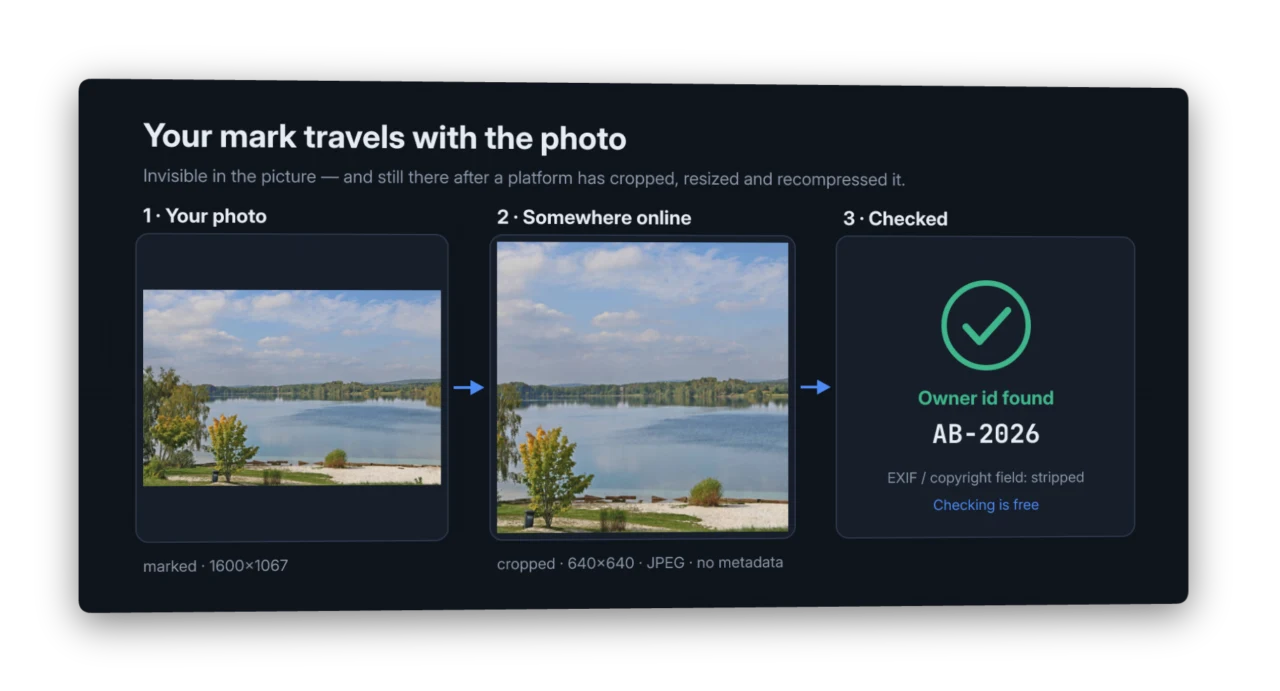
A real run, not a mock-up: marked, cropped, resized and recompressed by a "platform", then checked. Lake photo (Murner See): W. Bulach, CC BY-SA 4.0; the graphic is under the same licence.
The trouble with metadata
Copyright notice, name, contact — on most photos all of this sits in the EXIF and IPTC fields. Social networks, messengers and many websites delete exactly those fields on upload. What is left is a picture with no trace of you.
A visible watermark spoils the picture and is quickly cropped away.
What OpticScript does differently
The id is woven into the image itself, spread across the whole picture and so fine that you cannot see it. It survives what usually happens to photos online:
- Recompression — including strong JPEG compression
- Resizing — to web size, down to half
- Cropping — trimmed edges, the square Instagram format
- Turning and mirroring — stood on end, upside down, flipped
- Stripped metadata — the id does not need it
In our tests with 24 photos the id was found again after these typical changes in 23 to 24 of 24 cases. A wrong id was never reported: when OpticScript finds an id, it is the right one. Unmarked photos were never mistaken for marked ones.
Anyone can check
Whether a picture carries an id can be checked in every edition of OpticScript, the free one included. That matters in a dispute: the other side, a lawyer or a platform does not have to buy anything to follow your evidence.
MLC Foto-Schutz (Photo Protect) — without a line of script
For everyday work there is a small app of its own, installed with OpticScript on Windows, macOS and Linux. One window, two jobs:
- Protect: drop in photos or a whole folder. Each photo gets its id and an entry in your register. The original stays untouched; the protected copy keeps its capture data and colour profile and gets a digital seal.
- Check: drop in a photo — the app tells you whose it is, when it was registered and whether it has been cropped or edited since. Also for photos of other photographers whose register you have.
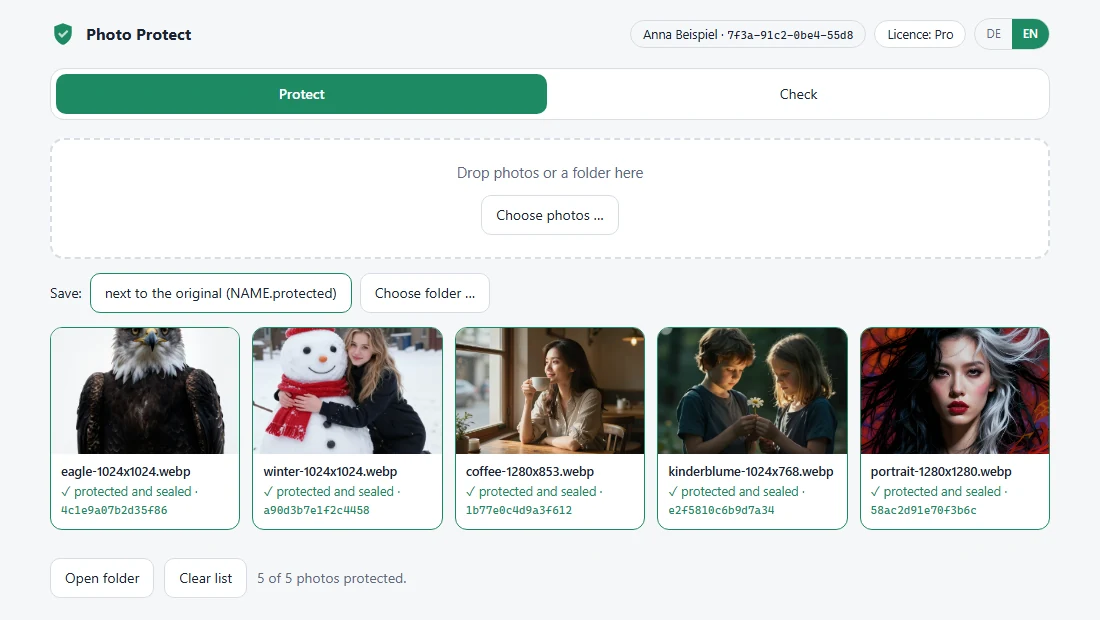
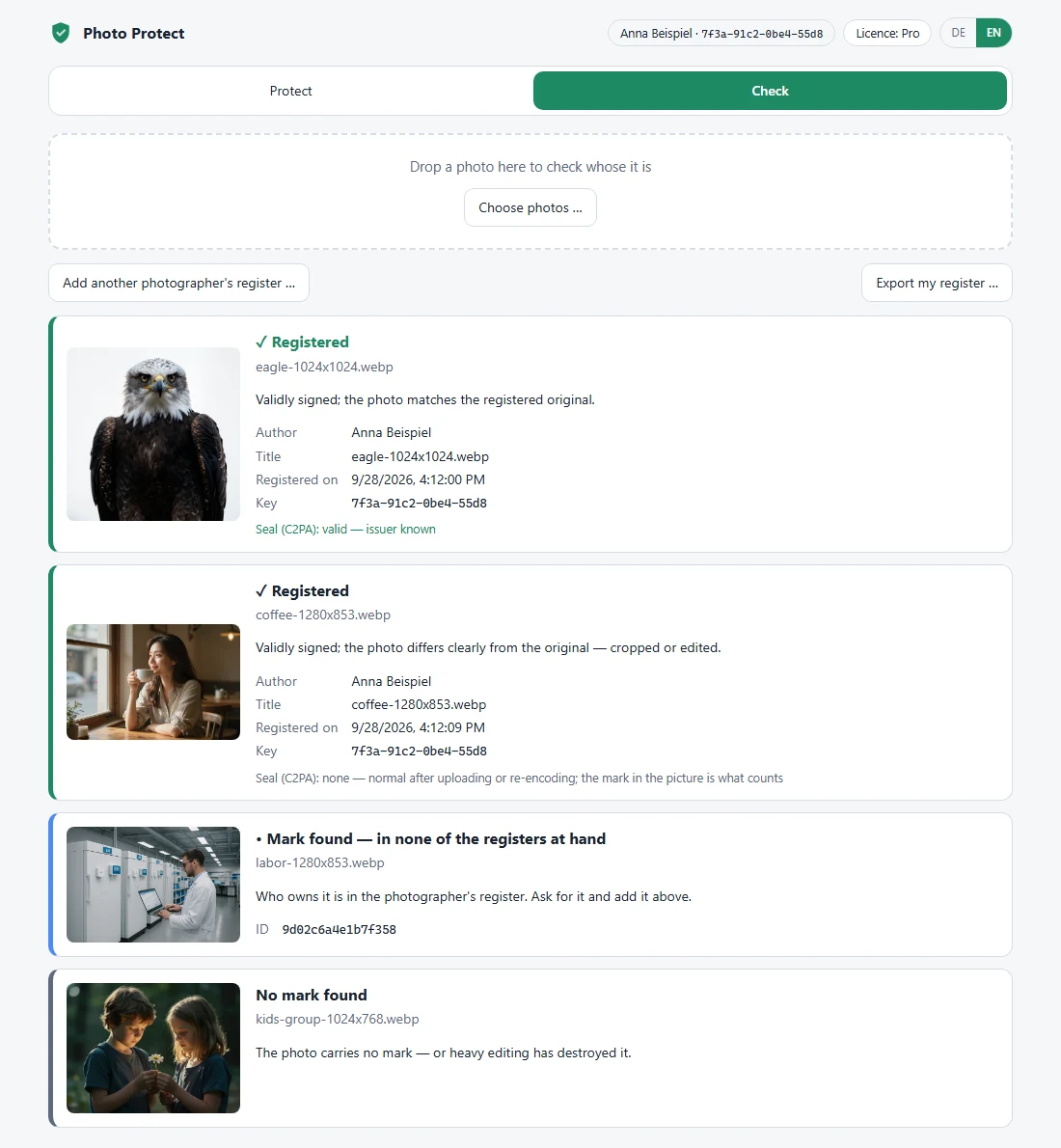
Protecting: 10 photos a month for free, no limit with OpticScript Pro. Checking is free — in the app as well.
A register that holds up
An id alone only says "this photo carries number X". The register says whose X is. Protecting creates an entry for each photo with your name, the time, the title and a fingerprint of the image — digitally signed with a key that never leaves your computer. The id in the photo is the fingerprint of exactly this entry.
- Cannot be faked: without your key nobody can create an entry that matches your id.
- Hand it on: export your register as a file for clients, agencies or a lawyer. It holds only the entries and your public key — nothing secret. With it, anyone can check.
- Cannot be overwritten: a photo that already carries an id is not protected a second time — not by anyone else either.
Public lookup: the MLC Photo Registry
Whoever finds an ID can look it up in the MLC Photo Registry — whether and since when it is registered, without your exported register. Foto-Schutz submits your entries there if you agree: only the signed entries, never a photo. Your name is public only if you allow it in your account. Optional and free; you turn on automatic submission yourself.
A seal that shows any change
On top of the id in the picture, Photo Protect seals the file following the open C2PA standard ("Content Credentials"), which cameras, Adobe and major platforms read. The seal names you as author, carries your copyright and the register id, and is signed with the same key as your register.
Id and seal complement each other:
- The id survives editing — it proves the picture is yours even after uploading, resizing and cropping.
- The seal shows any change to the file, however small: checking your original says "valid"; if anything was altered, "invalid". Platforms often strip the seal on upload — then the id counts.
Whoever has your exported register sees your seal as "issuer known". Public checking sites confirm signature and integrity but call the issuer "unknown", because the certificate comes from you and not from one of the few official C2PA certificate authorities.
What it looks like in a script
const photo = Engine.loadImage(INPUT);
photo.resize(2048, 1365);                        // edit first
const r = photo.protect({ title: "Lake photo" }); // then protect and register
photo.save(OUTPUT, { quality: 90 });
const v = Engine.loadImage(INPUT).verify();
console.log(v.registered ? `${v.owner}, ${v.created}` : (v.found ? "id without a register" : "no id"));
Without a script the same works on the command line: mlcos-protect protect *.jpg and mlcos-protect verify photo.jpg — both with the
seal. Just the seal: mlcos-seal sign and mlcos-seal verify.
With the Batch Manager you mark a whole shoot in one go.
What it does and does not do
To be straight about it:
- Evidence, not copy protection. Nobody is stopped from copying. But you can show that a picture is yours.
- Heavy crops — once clearly less than about two thirds of the picture remains, the id becomes unreliable.
- Turned or mirrored? Pictures turned by 90°, 180°, 270° and mirrored ones are recognised — a photo tilted by just a few degrees is not.
- Heavy denoising or very strong noise weakens the id noticeably. Normal noise, sharpening and light blurring it survives.
- Very small images (thumbnails under about 300 pixels) have too little area to carry the id.
- Invisible means: not visible when viewing normally. For an even subtler mark choose a lower strength; for more resistance to heavy editing, a higher one.
Coming next
- A checker in the browser on mlcgo.eu: drop in a photo, see the result — no installation, and the photo never leaves your computer.